

TL;DR:
- File sharing security relies on client-side AES-256-GCM end-to-end encryption to protect files before upload, ensuring provider cannot access plaintext. Implementing layered controls like password protection, link expiration, and separate password delivery mitigates common vulnerabilities and complies with regulations such as GDPR and HIPAA. Enterprise MFT platforms enhance security through role-based permissions, audit logs, malware scanning, and DLP, essential for regulated industries handling sensitive data.
File sharing security is the practice of protecting files exchanged across networks using encryption, access controls, and monitoring to prevent unauthorized access and data breaches. For business owners and IT managers handling sensitive contracts, financial records, or patient data, weak file transfer practices expose organizations to GDPR fines, HIPAA violations, and ransomware attacks. The gold standard today is AES-256-GCM end-to-end encryption, which encrypts files on the client’s device before they ever leave the network. Understanding which technical controls and policies apply to your environment is the difference between compliance and a costly breach.
What are the key methods securing file sharing today?
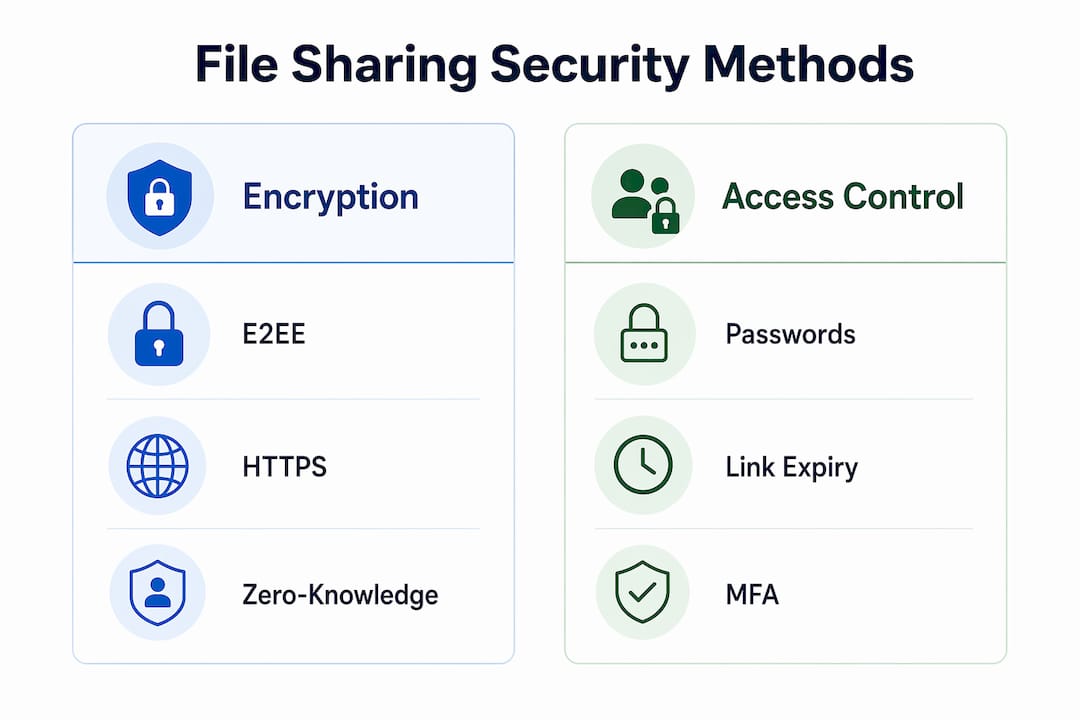
End-to-end encryption (E2EE) is the most critical technical control in any secure file transfer system. With AES-256-GCM, files are encrypted locally on the sender’s device before upload, meaning the service provider never holds the decryption keys or reads the plaintext content. This is what separates true E2EE from basic HTTPS, which only protects data while it moves between your browser and the server.

A common misconception is that HTTPS equals end-to-end encryption. HTTPS protects data in transit but leaves files readable by the server once stored, unless client-side encryption is applied before upload. Many mainstream platforms use HTTPS without client-side encryption, which means the provider can technically access your files.
Zero-knowledge architecture takes this further. Encryption keys embedded in URL fragments are never transmitted to the server by browser design, so the provider has no technical ability to decrypt your files. Platforms built on this model, such as those using SecuShare-style architecture, give businesses the strongest privacy guarantee available.
Beyond encryption, three access controls significantly reduce attack vectors:
- Password protection: Require a unique password for every shared link.
- Link expiration: Set short expiry windows, such as 24 to 72 hours, to eliminate stale access.
- Download limits: Cap the number of times a file can be downloaded to detect unauthorized access.
Pro Tip: Never send a shared link and its password in the same email. If that email is compromised, the password provides zero protection. Send the password via a separate channel, such as SMS or a phone call, to maintain real security.
The table below compares the three main encryption approaches by protection level and use case:
| Encryption type | What it protects | Provider access | Best for |
|---|---|---|---|
| HTTPS (TLS) | Data in transit only | Yes, once stored | General web browsing |
| At-rest encryption | Stored files on server | Yes, provider holds keys | Basic cloud backup |
| Client-side E2EE (AES-256-GCM) | Data before upload and at rest | No, zero-knowledge | Sensitive business files |
How do enterprise MFT solutions enhance security for regulated industries?
Managed File Transfer (MFT) platforms are purpose-built for organizations that must satisfy audit requirements under GDPR, HIPAA, SOX, or PCI-DSS. Consumer-grade tools like personal Dropbox accounts or WeTransfer lack the controls that compliance officers and auditors require. MFT solutions close that gap with features that go well beyond basic encryption.
Enterprise MFT platforms provide granular role-based permissions, automated audit logging, malware scanning, and Data Loss Prevention (DLP) policies. These features are not optional extras. They are the minimum threshold for regulated data handling in healthcare, finance, and legal sectors.
Here are the five capabilities IT managers must verify before selecting an MFT platform:
- Role-based access control (RBAC): Assign permissions by job function, not by individual, so access scales without creating security gaps.
- Automated audit logs: Every upload, download, and access event is timestamped and stored for a defined retention period to satisfy audit requests.
- Real-time malware scanning and sandboxing: Files are inspected on upload and download to catch ransomware and zero-day threats before they reach endpoints.
- Data Loss Prevention (DLP): Automated policies flag or block transfers of files containing sensitive patterns, such as Social Security numbers or credit card data.
- Automated file expiration and activity alerts: Files are deleted after a set period, and administrators receive alerts when unusual access patterns occur.
Real-time monitoring and compliance enforcement reduce breach risks and satisfy audit requirements in a way that manual processes cannot replicate. For IT managers coordinating file distribution across teams, pairing MFT with solid project management methods creates a workflow where security controls are embedded in the process rather than bolted on afterward.
What are the common risks in file sharing and how to mitigate them?
The most underestimated risk in file sharing is not a sophisticated cyberattack. It is a link that was never expired. Unprotected or stale shared links remain active long after the intended recipient has downloaded the file, leaving sensitive data accessible to anyone who finds or intercepts the URL.
Shadow IT compounds this problem significantly. When employees use unapproved tools, such as personal Google Drive accounts or consumer file-sharing apps, IT teams lose visibility into what data is leaving the organization and where it is going. The solution is not to restrict employees more aggressively. It is to provide a secure, easy-to-use official alternative that removes the incentive to work around policy.
Malicious file injection is a third vector that many businesses overlook. Attackers embed ransomware or zero-day malware inside shared files, which execute when a recipient opens them. Content Disarm and Reconstruction (CDR) and sandboxing during upload and download are the technical controls that neutralize this threat before it reaches endpoints.
Practical mitigations to implement immediately:
- Password-protect every shared link without exception, regardless of file sensitivity.
- Set expiration dates on all links, defaulting to 48 hours unless a longer window is operationally required.
- Verify recipient identity for files containing personally identifiable information (PII) or financial data before sending.
- Audit active links monthly to revoke any that remain open beyond their intended use.
- Train employees to recognize phishing attempts that use file-sharing notifications as lures.
Pro Tip: Layered security combining encryption, access control, and malware scanning provides far stronger protection than any single control alone. Think of it as a vault with a lock, a guard, and a camera. Removing any one layer weakens the entire system.
How does secure file sharing compare with cloud storage for business needs?
Secure file transfer and cloud storage solve different problems, and confusing the two leads to mismatched security controls. Cloud storage platforms like Microsoft OneDrive or Google Drive are designed for persistent file access, collaboration, and long-term retention. Secure file transfer services are designed for time-limited, controlled delivery of specific files to specific recipients.
Cloud storage typically retains files indefinitely, which creates a growing attack surface over time. Secure file transfer services use automatic expiry to minimize how long sensitive data is exposed. This distinction matters enormously for compliance. GDPR’s data minimization principle, for example, requires that personal data is not kept longer than necessary. Automatic expiry in file transfer tools directly supports that requirement.
For a practical comparison, the table below maps key features to each approach:
| Feature | Secure file transfer | Cloud storage |
|---|---|---|
| File retention | Short-term, auto-expiry | Indefinite by default |
| Encryption model | Client-side E2EE | Provider-managed (at-rest) |
| Access control | Per-link password and expiry | Folder and user permissions |
| Audit trail | Per-transfer event logs | Folder-level activity logs |
| Malware scanning | On upload and download | Varies by platform |
| Best use case | Sending sensitive files to external parties | Internal team collaboration |
If your organization needs both persistent collaboration and secure external delivery, the answer is to use both tools for their intended purposes. Explore cloud storage options for business to find platforms that complement a dedicated secure transfer workflow.
What steps can IT managers take to improve file sharing security now?
Improving file sharing security does not require a full platform overhaul. Most organizations can close the majority of their exposure with six targeted steps implemented in sequence.
- Select a provider with zero-knowledge E2EE. Confirm that the platform uses client-side encryption with AES-256-GCM and that the provider cannot access your files or keys.
- Enforce password protection on every link. Make this a policy requirement, not a recommendation. No exceptions for “low-sensitivity” files, since attackers do not know what you consider low-sensitivity.
- Send passwords out-of-band. Establish a written policy requiring that link passwords are always shared via a different channel than the link itself, such as SMS, phone, or a secure messaging app.
- Set default link expiration to 48 hours. Longer windows require manager approval. This single policy eliminates the stale-link risk that accounts for a large share of unauthorized access incidents.
- Deploy approved tools to all staff. Provide a secure, user-friendly official option so employees have no practical reason to use personal accounts. Friction in the approved tool is the primary driver of shadow IT.
- Educate employees on phishing via file-sharing notifications. Attackers routinely spoof file-sharing alerts from platforms like Dropbox or SharePoint. A 30-minute annual training session on recognizing these lures measurably reduces click rates.
Key takeaways
Effective file sharing security requires client-side AES-256-GCM encryption, enforced access controls, and active malware inspection working together as a layered system.
| Point | Details |
|---|---|
| Use client-side E2EE | AES-256-GCM encryption before upload ensures providers cannot access your files. |
| Enforce three access controls | Password protection, link expiration, and download limits together close the most common attack vectors. |
| Choose MFT for compliance | Enterprise MFT platforms provide audit logs, DLP, and malware scanning required under GDPR and HIPAA. |
| Separate link from password | Always send the shared link and its password via different channels to maintain protection if email is compromised. |
| Match tool to use case | Use secure file transfer for external delivery and cloud storage for internal collaboration, not one for both. |
Why zero-knowledge encryption is the only standard worth adopting in 2026
I have spent years watching organizations treat file security as a checkbox. They enable HTTPS, call it done, and move on. That approach was inadequate five years ago. In 2026, it is negligent.
The shift I find most significant is not in encryption algorithms. AES-256-GCM has been the right answer for years. The real change is in how attackers target the provider layer rather than the file in transit. If your file sharing provider holds your encryption keys, your security is only as strong as their security posture, their employee access policies, and their legal exposure to government data requests. Zero-knowledge architecture removes the provider from the equation entirely. That is not a marketing claim. It is a structural guarantee.
The harder problem I see IT managers face is employee adoption. The most technically sound platform fails if staff find it clumsy and route around it. I have seen organizations deploy enterprise MFT tools that sat unused while employees emailed ZIP files to personal accounts. The balance between security and usability is not a soft concern. It is a direct determinant of whether your security policy actually functions in practice.
My recommendation: pick one zero-knowledge platform, make it the path of least resistance for staff, and enforce the three non-negotiable controls, which are passwords, expiration, and out-of-band password delivery. You do not need to solve every threat vector at once. You need to close the gaps that account for the majority of real incidents. Start there, then layer in malware scanning and DLP as your program matures.
— Maayan
Secure your digital infrastructure with Seo-analytic
File sharing security does not exist in isolation. It sits inside a broader digital infrastructure that includes your website, hosting environment, and data handling practices. Seo-analytic helps business owners build that infrastructure correctly from the ground up. Whether you are setting up a secure online presence or reviewing your current setup, the website building guide for business owners walks you through the decisions that affect both security and performance. For businesses evaluating their hosting environment as part of a security review, the website hosting guide covers the options that support secure data handling at the infrastructure level.
FAQ
What is the most secure method for file sharing?
End-to-end encryption using AES-256-GCM with zero-knowledge architecture is the most secure method. It encrypts files on the sender’s device before upload, so the provider never holds decryption keys.
Does HTTPS make file sharing secure?
HTTPS protects files only while they travel between your browser and the server. Once stored, files are readable by the provider unless client-side encryption is applied before upload.
What is shadow IT in file sharing?
Shadow IT refers to employees using unapproved tools, such as personal cloud accounts, to share files outside IT oversight. Providing a secure, easy-to-use official alternative is the most effective mitigation.
How long should shared file links remain active?
A default expiration of 48 hours is the recommended standard for sensitive files. Longer windows increase the risk of stale links being accessed by unintended parties.
What regulations require secure file transfer controls?
GDPR, HIPAA, SOX, and PCI-DSS all require documented access controls, audit logs, and data protection measures that enterprise MFT platforms are specifically designed to satisfy.