

TL;DR:
- GA4 redefines bounce rate as the percentage of sessions lacking engagement, not immediate exits.
- High bounce rates may indicate expectation mismatches, technical issues, or content gaps.
- Benchmarking bounce rate requires context, segmentation, and linking to conversion metrics for meaningful insights.
Many digital marketers still argue over a number that Google quietly redefined years ago. Bounce rate appears in almost every analytics dashboard, yet its meaning has shifted so significantly with GA4 that campaigns built around old interpretations may be optimizing for the wrong thing entirely. Whether you’re running paid traffic, improving organic landing pages, or trying to convert more visitors into paying customers, understanding exactly what bounce rate tells you now versus what it told you in Universal Analytics is the difference between chasing vanity metrics and making decisions that actually grow your business.
Table of Contents
- What does bounce rate measure in website analytics?
- Common causes of high bounce rate
- Benchmarking bounce rate: What’s typical and what’s good?
- Actionable steps to analyze and reduce bounce rate
- Our take: What most marketers get wrong about bounce rate
- Elevate your analytics and drive real engagement
- Frequently asked questions
Key Takeaways
| Point | Details |
|---|---|
| Bounce rate redefined | GA4 measures bounce rate as the percentage of sessions that are not ‘engaged,’ requiring deeper analysis for meaningful insights. |
| Causes of high bounce | Expectation mismatches, technical issues, content gaps, and unclear next steps are the most common reasons visitors leave quickly. |
| Benchmarking tips | Industry averages aren’t enough; use your own site’s data and page context to set effective benchmarks for improvement. |
| Actionable fixes | Segment your analysis, prioritize technical and content fixes, and optimize CTAs for higher engagement and conversions. |
What does bounce rate measure in website analytics?
Bounce rate has always sounded straightforward: a visitor lands on your site and immediately leaves. But that surface-level description hides a lot of complexity, especially now that GA4 has rewritten the rules.
In Universal Analytics, a bounce was recorded any time a user visited a single page and left without triggering a second request to the analytics server. That meant someone could read your entire 2,000-word blog post, click nothing, and still be counted as a bounce. Clearly, that definition had real limits.
GA4 changed the framework entirely. Bounce rate is a website analytics metric that measures the share of sessions that do not “engage” further, and engagement is now the core concept. Specifically, bounce rate in GA4 is defined as the percentage of sessions that were not engaged sessions, where engagement is determined by criteria such as time on site, page/screen views, and conversion events.
Here is what that means practically:
- Engaged session: The user spends at least 10 seconds on the site, views 2 or more pages, or triggers a conversion event.
- Bounced session: None of those conditions are met.
- Bounce rate: The percentage of total sessions that bounced.
This is a meaningful shift. A user who reads your pricing page for 45 seconds and leaves is now counted as engaged, not bounced, even if they visited only one page. That alone changes how you should read historical versus current data.
| Metric | Universal Analytics | GA4 |
|---|---|---|
| Bounce definition | Single-page sessions | Sessions without engagement |
| Time threshold | Not factored | 10 seconds minimum |
| Engagement events | Not considered | Counted as engagement |
| Inverse metric | Not tracked | Engagement rate |
The key takeaway for marketing managers is to treat bounce rate as a diagnostic metric, not a performance score. It tells you where to look, not necessarily what is broken. You can explore bounce rate benchmarks as a starting reference, but the definition you’re working with matters before any comparison is meaningful.
Common causes of high bounce rate
Once you understand how bounce rate is measured, the next step is to diagnose why visitors leave after only minimal interaction. The causes generally fall into four clear categories, and each one calls for a different fix.

1. Expectation mismatch
This is the most common and most fixable cause. If your ad promises one thing and the landing page delivers another, visitors leave immediately. It does not matter how beautiful your design is. A user who searched for “affordable CRM for small teams” and lands on an enterprise pricing page will bounce, every time.
2. Technical friction
Slow load times, broken images, pop-ups that block content on mobile, and unresponsive layouts all drive users away before they can engage. Mobile visitors are especially unforgiving. If a page takes longer than three seconds to load, a significant share of users are already gone.
3. Content gaps
Sometimes the page loads fine and matches the ad, but the content does not go deep enough. A blog post that promises “how to set up GA4” but spends 80% of the article on background context will frustrate readers who came for actionable steps. Thin content produces bounces. For a structured approach to this issue, a content audit checklist can help you identify where depth is missing across your site.
4. Unclear next steps
No obvious CTA, confusing navigation, or a page that simply ends with no prompt sends users off the page with nothing to do next. Even engaged readers need a clear path forward.
Bounce rate is often used as a diagnostic signal, potentially indicating expectation mismatch, technical friction, content gaps, or unclear next steps, but it should be interpreted in context because some pages are designed for single-visit outcomes.
That last point matters. A contact confirmation page or a “thank you” page will always have a high bounce rate, and that is expected behavior, not a problem to fix. When reducing bounce rate, always start by confirming the page’s intended purpose before treating any high number as an alarm.
| Cause | Common symptom | Quick diagnostic |
|---|---|---|
| Expectation mismatch | High bounce on paid pages | Compare ad copy to landing page headline |
| Technical friction | High bounce on mobile | Run a Core Web Vitals report |
| Content gaps | Short session duration | Check average time on page by post |
| Missing CTAs | Low conversion on key pages | Review page scroll depth in GA4 |
Benchmarking bounce rate: What’s typical and what’s good?
With causes identified, marketers need to know if their bounce rate is typical or signals a bigger issue. This is where most teams run into trouble, because they reach for industry averages without accounting for the context that makes those numbers meaningful.
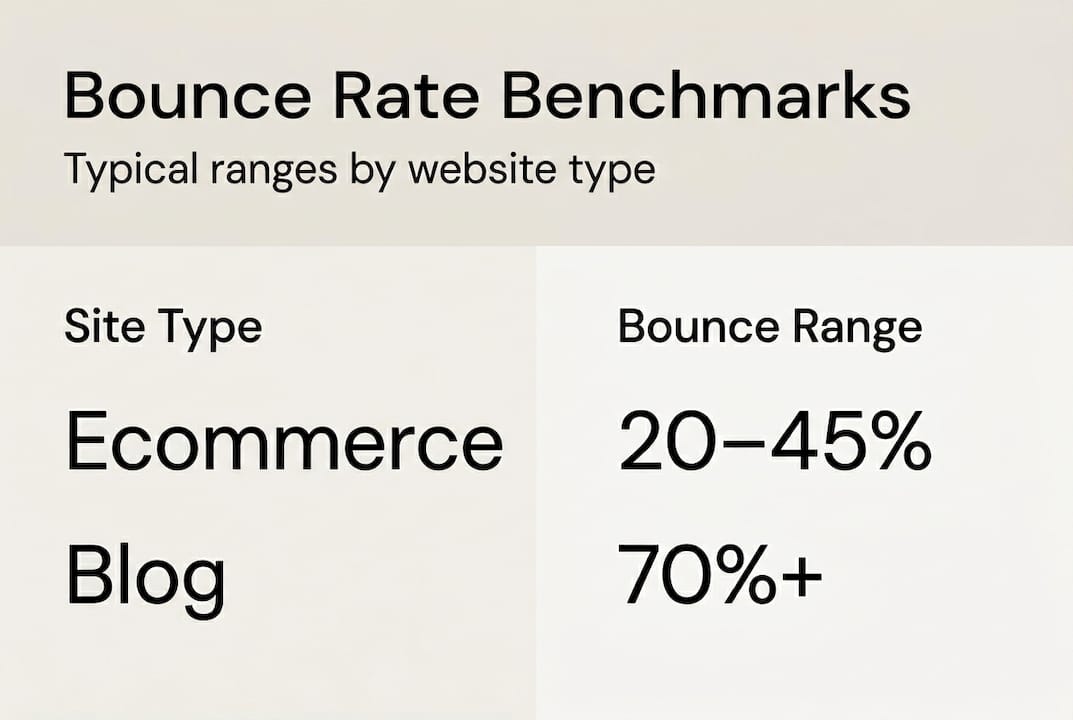
There is no single universal “good” bounce rate benchmark; typical ranges vary by site type and purpose. Here is what general ranges tend to look like:
| Site type | Typical bounce rate range |
|---|---|
| Ecommerce product pages | 20% to 45% |
| Lead generation pages | 30% to 55% |
| Blog and informational content | 50% to 75% |
| News and media | 65% to 90% |
| Single-page apps | 10% to 30% |
These are rough guides, not targets. A 70% bounce rate on a blog post might be perfectly healthy if average session duration is high and organic traffic is growing. That same number on a paid search landing page would be a serious problem worth immediate attention.
The GA4 definition change also means older benchmarks from Universal Analytics reports are not directly comparable. A campaign that showed a 58% bounce rate two years ago cannot be compared to today’s GA4 engagement-based number without understanding how the methodology shifted.
Here’s what actually matters for cut bounce rate for conversions goals:
- Your own historical data across comparable time periods
- Segment-level comparison by channel, device, and page type
- Correlation with conversion rate, not bounce rate alone
- Trends over time, not single-point snapshots
Pro Tip: Instead of asking “Is 55% a good bounce rate?” ask “What changed in my bounce rate last week, and which segment drove it?” That question leads to answers. The first one leads to guesswork. Tying bounce rate to conversion rate impact is how you build a case for real optimization investment.
Actionable steps to analyze and reduce bounce rate
After benchmarking, you’re ready for actionable strategies to improve bounce rate and outcomes. Here is a practical methodology that works across both paid and organic channels.
-
Confirm your GA4 setup first. Before drawing any conclusions, verify that your GA4 bounce rate methodology is correctly configured. Check that engagement events are firing and that your reporting view distinguishes between engagement rate and bounce rate. Comparing bounce rates over time or across channels requires accounting for GA4’s engagement-based definition.
-
Segment by landing page and traffic source. Pull bounce rate data broken down by page URL and acquisition channel. Paid social often shows very different patterns from organic search. Mobile traffic frequently bounces at higher rates than desktop. These differences point you toward specific fixes rather than broad guesses.
-
Diagnose the friction. Once you identify a high-bounce segment, ask whether the cause is expectation mismatch, technical friction, a content gap, or a missing CTA. Each diagnosis has a different fix. Run a Core Web Vitals check on slow pages. Review ad copy against landing page headlines for traffic arriving from campaigns.
-
Test targeted fixes. The most actionable methodology is to analyze high-bounce landing pages by traffic source and intent, then test fixes that reduce friction and better match the ad or search promise to on-page content and CTAs. Use A/B testing for headline changes, CTA placement, and content depth. Explore resources on test landing pages to build a structured testing program.
-
Track the conversion impact. Reducing bounce rate is only valuable if it moves conversion numbers. Monitor goal completions and revenue alongside bounce rate changes. A page with a 10% lower bounce rate but flat conversions may need a different type of fix. Review landing page best practices to align engagement improvements with actual business outcomes.
Pro Tip: Set up GA4 explorations to view bounce rate by device and landing page simultaneously. This combination almost always surfaces the highest-priority fix faster than any single-dimension report.
Statistic to keep in mind: Pages that fully match search intent and load in under two seconds consistently produce engagement rates significantly higher than the site average, making page speed and content alignment two of the highest-return improvements you can make.
For a broader look at reduce bounce rate tactics, apply the segmentation framework above before committing resources to any single fix.
Our take: What most marketers get wrong about bounce rate
Here is the uncomfortable truth most analytics articles avoid: chasing a lower bounce rate without context can actively mislead your optimization efforts.
We see this regularly. A marketing team spots a 68% bounce rate, panics, and starts redesigning pages, adding pop-ups, and stuffing in more internal links. Six weeks later, bounce rate drops to 52% and conversion rate drops too, because the “improvements” interrupted the exact journey that was working.
GA4’s engagement-based definition was supposed to fix this by tying bounce rate to meaningful interaction rather than page count. But many teams are still using old benchmarks with new data, which produces conclusions that make no sense.
High-intent search traffic can legitimately drive high bounce rates if the page answers the question completely and the user leaves satisfied. That is a good outcome. Single-purpose pages like checkout confirmations or event registrations exist for exactly one interaction and should always be excluded from broad bounce rate analysis.
Avoid the common website mistakes of treating every metric as a universal target. The smarter approach is to always correlate bounce rate with conversion outcomes and revenue, not just with other engagement numbers. A page that converts at 8% with a 70% bounce rate is outperforming a page that converts at 2% with a 40% bounce rate, every single time.
Elevate your analytics and drive real engagement
Understanding bounce rate is one piece of a bigger picture. Turning that understanding into real business results requires the right tools, frameworks, and expertise working together.

At seo-analytic.com, our resources help digital marketing managers and business owners move from data confusion to confident decision-making. Whether you’re starting with digital marketing basics or comparing digital marketing tools to find the best fit for your analytics stack, we give you the context you need to act fast and measure accurately. For teams ready to go deeper, our guide on advanced bounce rate strategies covers the full methodology from GA4 setup to conversion-focused testing. Your analytics should be driving growth, not creating confusion.
Frequently asked questions
What is a bounce rate in Google Analytics 4?
Bounce rate in GA4 is the percentage of sessions that were not engaged, based on specific criteria like time on site, page views, or conversion events. It is the inverse of the engagement rate metric.
What is considered a ‘good’ bounce rate?
Typical bounce rates vary from 30% to over 70% depending on site type and purpose. There is no universal benchmark; your own historical data and conversion correlation are the most reliable guides.
Why do some pages have intentionally high bounce rates?
Some pages are built for a single user action, such as a thank-you page or event registration confirmation, so high bounce rates can be expected and are not always a signal of poor performance.
How can I reduce bounce rate on my website?
Segment bounce rates by landing page and traffic source, identify whether the cause is expectation mismatch, technical issues, or missing CTAs, then test fixes that reduce friction and better align your on-page content with what brought the user there.
Recommended
- Reducing Website Bounce Rate for Higher Engagement – seo analytic
- Improving Website Conversion Rate: Step-by-Step Guide – seo analytic
- Conversion Rate: Boosting Online Growth for Businesses – seo analytic
- Engagement on Social Media: Complete Guide for 2025 – seo analytic
- 5 key benefits of website optimization for SMEs
- Why 20% Higher Bounce Rates on iGaming SEO Keywords Demand Strategy