

TL;DR:
- SSL certificates authenticate website identity and enable encrypted communications to protect user data. Proper management, validation, and protocol configurations are essential for site security, trust, and SEO benefits. Treat SSL as critical infrastructure with automated renewals and regular audits to prevent outages and maintain trust.
An SSL certificate is a cryptographic digital credential that authenticates a website’s identity and enables secure, encrypted communication between a client and server. Issued by trusted third parties called certificate authorities (CAs), including DigiCert and Let’s Encrypt, these credentials are the backbone of every HTTPS connection you see in a browser. As of 2026, over 95% of global web traffic is encrypted via HTTPS, which means your visitors already expect a secure connection before they read a single word on your site. What most website owners miss is that the certificate itself is only one layer of a larger trust system. Understanding how it works gives you real control over your site’s security, reputation, and search performance.
SSL certificates explained: what they are and why they matter
SSL stands for Secure Sockets Layer, but SSL is technically obsolete. The protocol running every secure connection today is TLS, Transport Layer Security. The industry still uses the term “SSL certificate” out of habit, but you are always deploying a TLS certificate. Knowing this distinction matters because servers that still support legacy SSL 2.0 or SSL 3.0 carry known vulnerabilities that attackers actively exploit.
Every TLS certificate performs three core functions. First, it authenticates the server, proving to your visitor’s browser that your domain is genuinely yours and not an impersonator. Second, it enables encryption, scrambling data in transit so that intercepted packets are unreadable. Third, it guarantees data integrity, meaning the content your server sends arrives at the browser exactly as you sent it, without tampering.
Certificate authorities sit at the center of this system. A CA like DigiCert, Sectigo, or Let’s Encrypt signs your certificate after verifying your identity to some degree. Browsers and operating systems ship with a pre-installed list of trusted CAs. When your visitor’s browser sees your certificate, it checks that chain of trust back to a recognized root CA. If the chain breaks anywhere, the browser throws a warning that sends most visitors straight to the back button.
What are the types and validation levels of SSL certificates?
Not all certificates carry the same level of trust. The three validation tiers reflect how thoroughly the CA verified your identity before issuing the credential.
Domain Validated (DV) certificates confirm only that you control the domain. Issuance takes minutes and costs nothing through Let’s Encrypt. DV is the right choice for blogs, informational sites, and development environments where proving business identity is not required.
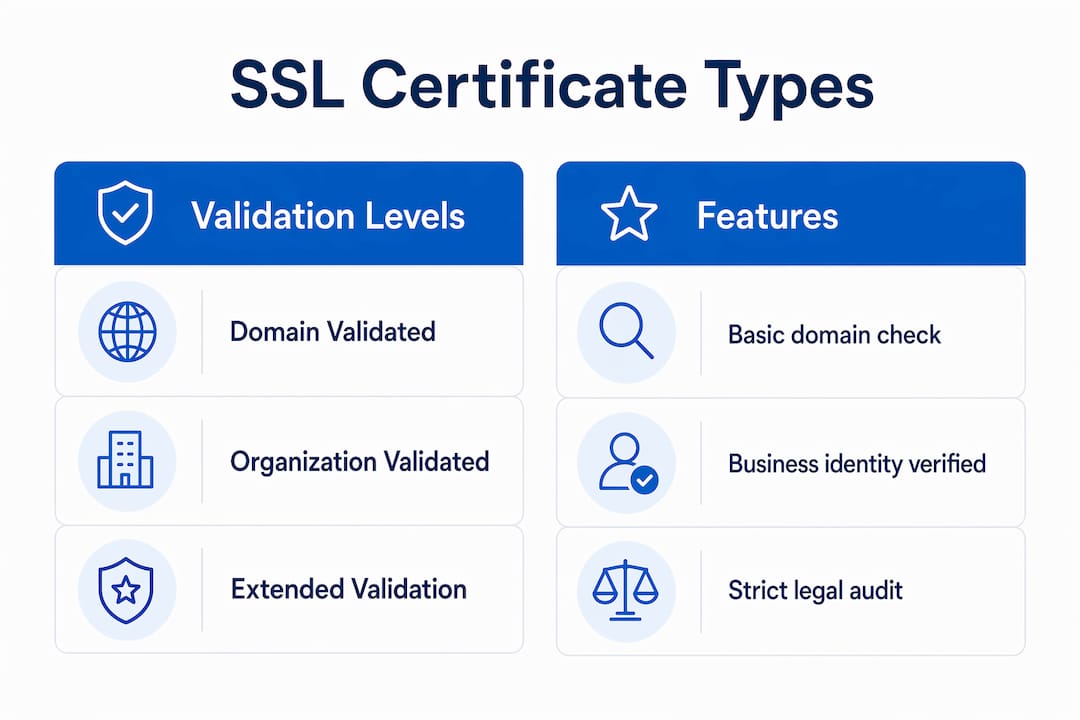
Organization Validated (OV) certificates require the CA to verify your business registration, physical address, and phone number. OV certificates cost around $200 per year and take one to three business days to issue. They are appropriate for corporate websites, SaaS platforms, and any site where visitors need to know a real business is behind the domain.
Extended Validation (EV) certificates carry the highest verification rigor. The CA audits your legal existence, operational status, and authorization. EV certificates cost $500 or more annually and are standard for financial institutions, e-commerce checkouts, and healthcare portals where user trust directly affects conversion.
Beyond validation level, certificates also differ in coverage scope.
| Certificate type | Validation level | Approx. cost | Issuance time | Best use case |
|---|---|---|---|---|
| Single-domain DV | Domain only | Free to $50/yr | Minutes | Blogs, landing pages |
| Wildcard DV/OV | Domain + subdomains | $100 to $300/yr | Minutes to days | SaaS apps, multi-subdomain sites |
| Multi-domain (SAN) | DV, OV, or EV | $200 to $600/yr | Minutes to days | Agencies managing multiple domains |
| EV single-domain | Full business audit | $500+/yr | 1 to 5 days | Banks, e-commerce, healthcare |
Pro Tip: If you run a marketing site with a checkout page, pair a DV wildcard for subdomains with an EV certificate on the payment path. You get broad coverage at low cost while showing maximum trust exactly where visitors make financial decisions. Learn how trust badges and certificates affect buyer confidence at different stages of the funnel.
How do SSL/TLS certificates work to secure connections?
The security you see as a padlock in the browser address bar is the result of a precise sequence called the TLS handshake. This happens in milliseconds before any page content loads.
- Client Hello. Your visitor’s browser sends a list of supported TLS versions and cipher suites to your server.
- Server Hello. Your server responds by selecting the strongest mutually supported options and sending its TLS certificate.
- Certificate verification. The browser validates the certificate against its trusted CA list, checks the expiration date, and confirms the domain matches.
- Key exchange. Using asymmetric encryption (public and private keys), the browser and server agree on a shared session key without ever transmitting it directly.
- Session established. Both sides switch to symmetric encryption using that session key for all subsequent data transfer, because symmetric encryption is far faster for bulk data.
TLS 1.3, the current industry standard, cuts this handshake to a single round trip and supports 0-RTT resumption for returning visitors. It removes legacy algorithms like RSA key exchange and RC4, which were the targets of several high-profile attacks in the TLS 1.2 era.
One technical detail that trips up many site operators is the certificate chain. Your leaf certificate (the one issued to your domain) is signed by an intermediate CA, which is in turn signed by a root CA. Browsers trust root CAs natively, but they need the intermediate certificate to build that chain. Missing intermediates cause “unable to verify” errors on clients that have not cached them, making a perfectly valid certificate appear broken to real visitors.
OCSP Stapling is another mechanism worth understanding. The Online Certificate Status Protocol lets your server attach a CA-signed timestamp confirming your certificate has not been revoked. Without stapling, the browser must query the CA’s OCSP server on every connection, adding latency and a potential privacy leak. With stapling enabled, revocation checks happen server-side and the result is bundled with the handshake.
Pro Tip: Test your full certificate chain using SSL Labs’ free server test at ssllabs.com. A grade of A or A+ confirms your chain, protocol versions, and cipher configuration are all correct. Anything below B is a signal that visitors on older Android devices or corporate proxies may see errors.
Why are SSL certificates important for SEO, user trust, and compliance?
Google made HTTPS a ranking signal in 2014, and that signal has only grown in weight as HTTPS adoption has become the norm rather than the exception. A site without a valid certificate now faces a double penalty: lower organic rankings and browser warnings that actively discourage visitors from entering.

The browser warning problem is more damaging than most marketers realize. Chrome, Firefox, and Safari all display full-page interstitial warnings for expired, self-signed, or misconfigured certificates. These warnings use language like “Your connection is not private” and require users to click through multiple steps to proceed. Most users do not proceed. The result is an immediate, measurable drop in traffic and conversions that no amount of ad spend can offset.
For websites handling payments, SSL is not optional from a legal standpoint. The Payment Card Industry Data Security Standard (PCI DSS) requires valid TLS certificates on any system that transmits cardholder data. A lapsed certificate on a checkout page is not just a trust problem. It is a compliance violation that can result in fines and loss of payment processing privileges.
The padlock icon can mislead users in one important way. A padlock confirms the connection is encrypted, not that the site itself is safe or legitimate. Threat actors routinely obtain free DV certificates for phishing domains, so a padlock on a fake banking site looks identical to one on the real bank’s site. This is why OV and EV certificates matter for businesses. They prove a verified organization stands behind the domain, not just that the connection is encrypted. Pairing your certificate strategy with conversion optimization practices that reinforce trust signals throughout the user journey produces measurably better results than relying on the padlock alone.
What are best practices and common mistakes in SSL certificate management?
Certificate management is where most organizations fail. The certificate itself is straightforward to obtain. Keeping it configured correctly over time is the operational challenge.
Protocol and cipher hygiene is the starting point. Disable SSL 2.0, SSL 3.0, TLS 1.0, and TLS 1.1 at the server level. These protocols have known vulnerabilities and no modern browser requires them. Enforce TLS 1.2 as the minimum and prioritize TLS 1.3 for all connections.
Always serve the full certificate chain. Configure your web server (Apache, Nginx, or IIS) to include the intermediate certificate alongside your leaf certificate. Omitting intermediate certificates breaks HTTPS for a meaningful percentage of visitors, particularly those on mobile devices with limited CA caches.
Enable OCSP Stapling and HSTS. HSTS with preload instructs browsers to always connect via HTTPS and refuse any HTTP connection, protecting against protocol downgrade attacks and cookie hijacking. Submit your domain to the HSTS preload list at hstspreload.org once you are confident your HTTPS configuration is stable.
Automate certificate renewal. Certbot with the ACME protocol automates issuance and renewal for Let’s Encrypt certificates on a 90-day cycle. Expired certificates are a leading cause of production outages, and manual renewal processes fail because calendar reminders get missed. Set up automated renewal and a monitoring alert that fires 30 days before expiration as a backup.
Protect your private key. The private key is what makes your certificate yours. Store it with restricted file permissions (600 on Linux), never transmit it over email, and rotate it when staff with access leave your organization. A compromised private key means an attacker can impersonate your server even with a valid certificate.
| Common mistake | Consequence | Fix |
|---|---|---|
| Expired certificate | Browser warning, traffic loss | Automate renewal with Certbot |
| Missing intermediate cert | Errors on mobile and older clients | Include full chain in server config |
| Mixed content warnings | Partial padlock, SEO penalty | Audit all page assets and force HTTPS |
| Legacy TLS 1.0/1.1 enabled | Vulnerability to POODLE, BEAST attacks | Disable in server config, enforce TLS 1.2+ |
| No HSTS header | Downgrade attack exposure | Add HSTS with preload directive |
Pro Tip: Mixed content warnings appear when an HTTPS page loads any resource (image, script, or font) over HTTP. Use the browser console or a tool like WhyNoPadlock to identify every non-secure asset. Fix them before enabling HSTS, because HSTS with mixed content is worse than no HSTS at all.
Key takeaways
SSL/TLS certificates secure web connections through encryption and authentication, but their operational management, validation level, and protocol configuration determine whether they actually protect your site and your visitors.
| Point | Details |
|---|---|
| TLS replaced SSL | Always deploy TLS 1.2 or 1.3; disable legacy SSL and TLS 1.0/1.1 to close known vulnerabilities. |
| Validation level signals trust | DV proves domain control; OV and EV prove business identity and matter for e-commerce and finance. |
| Automate renewal | Use Certbot or a managed CA to renew certificates automatically and prevent outages from expiration. |
| Padlock does not equal safe | Encryption confirms the connection, not the site’s legitimacy; OV/EV certificates verify the organization. |
| HSTS and OCSP Stapling harden security | These two configurations protect against downgrade attacks and add revocation checking without latency. |
Why I treat SSL management as infrastructure, not a checkbox
Most website owners treat SSL as a one-time setup task. Install the certificate, see the padlock, move on. That mindset is exactly how organizations end up with a production outage at 2 a.m. because a certificate expired on a subdomain nobody was monitoring.
After working with dozens of websites across e-commerce, SaaS, and professional services, I have seen the same pattern repeatedly. The initial certificate gets installed correctly. Then the team grows, responsibilities shift, and nobody owns the renewal process. Eighteen months later, a customer service rep gets a call from a client who cannot access the login page. The certificate expired three days ago.
What I recommend to every client at Seo-analytic is to treat certificates as critical infrastructure, the same way you treat your domain registration or your hosting contract. That means documented ownership, automated renewal, and a monitoring alert that sends a notification 30 days before expiration. It means auditing your full certificate chain after every server migration. It means testing your TLS configuration with SSL Labs after any major change.
The padlock misconception also deserves more attention than it gets in most guides. I have seen marketing teams use the padlock as a primary trust signal in ad copy and landing pages. That is a mistake. Visitors who understand security know the padlock only means the connection is encrypted. The trust signal that actually moves conversions is the combination of a verified business identity (OV or EV certificate), visible trust badges, and a clean security posture across the site. Certificates are one piece of that picture, not the whole frame.
The organizations that get this right treat SSL management as a risk function with a named owner, a documented process, and regular audits. The ones that get it wrong find out at the worst possible moment.
— Maayan
Secure your website with the right foundation
A valid, correctly configured TLS certificate is the starting point for any trustworthy website, but it is only one piece of a secure, high-performing online presence. At Seo-analytic, we help website owners and digital marketers build sites that are secure, fast, and optimized for conversions from the ground up. Whether you are launching a new site or auditing an existing one, our website building guide walks you through every security and performance decision you need to make. For hosting that includes SSL management as part of the package, explore our hosting solutions built for business owners who want security handled correctly without the technical overhead.
FAQ
What is an SSL certificate in simple terms?
An SSL certificate is a digital file installed on a web server that proves the server’s identity and enables encrypted communication between the server and a visitor’s browser. The term “SSL” is still widely used, but the actual protocol is TLS.
How do I get an SSL certificate for my website?
You can get a free DV certificate through Let’s Encrypt using Certbot, or purchase an OV or EV certificate from a CA like DigiCert or Sectigo. Many hosting providers include free SSL certificates as part of their hosting plans.
What is the difference between DV, OV, and EV certificates?
DV certificates verify domain ownership only and are issued in minutes. OV certificates verify your business identity and take one to three days. EV certificates require a full legal audit and cost $500 or more per year, making them the highest-trust option for financial and e-commerce sites.
Does having an SSL certificate improve my Google rankings?
Google has used HTTPS as a ranking signal since 2014. A valid certificate is now a baseline requirement for competitive search performance, and sites without HTTPS face both ranking penalties and browser warnings that reduce organic traffic.
How often do SSL certificates need to be renewed?
Most certificates issued through Let’s Encrypt expire every 90 days. Commercially purchased certificates typically last one to two years. Automating renewal with tools like Certbot prevents the expired-certificate outages that are one of the most common and avoidable causes of website downtime.