

TL;DR:
- Dwell time measures the duration between a user clicking a search result and returning to the SERP, indicating page value. Improving dwell time relies on fast load speeds, in-depth content, effective internal linking, and engaging interactive features. Prioritizing speed and user intent alignment leads to sustained engagement and better search performance.
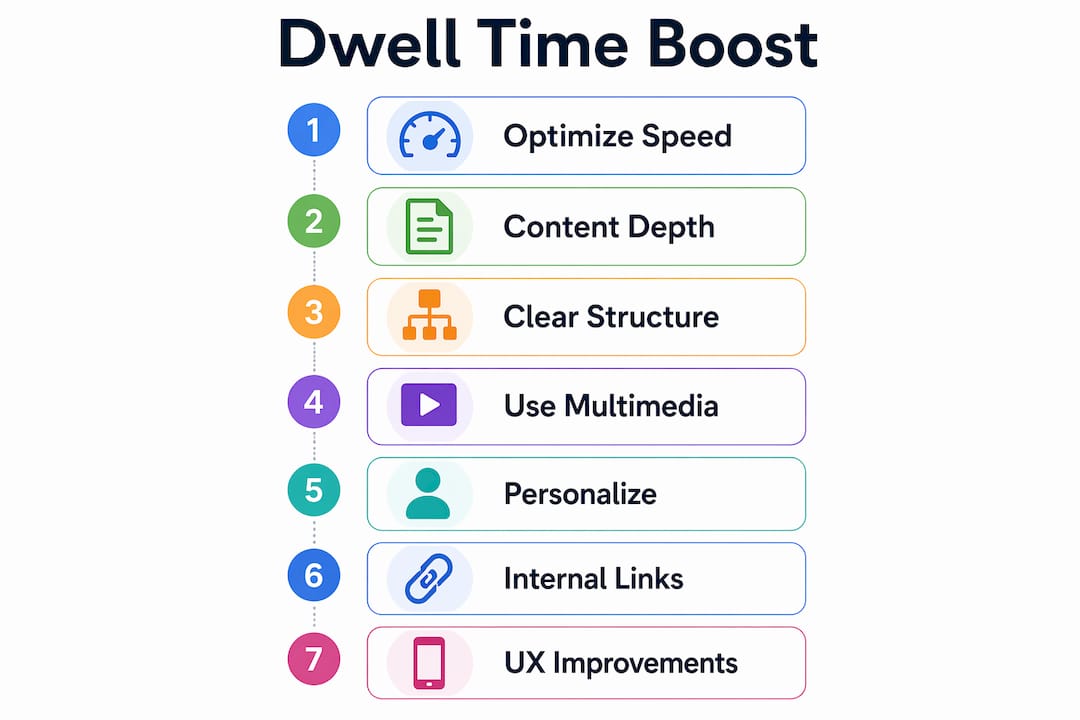
Dwell time is defined as the duration between a user clicking your search result and returning to the SERP, and it is one of the clearest signals Google reads to judge whether your page delivered value. Improving website dwell time is not about tricks. It is about making your content, speed, and layout so satisfying that visitors stay, read, and explore. This guide covers the exact levers that move the needle: page speed, content depth, internal linking, interactive features, and continuous measurement. Every tactic here is grounded in how real users behave, not how we wish they would.
How does page speed and mobile responsiveness affect dwell time?
Page load speed is the first filter every visitor applies, and most apply it in under three seconds. Poor LCP scores above 2.5 seconds cause visitors to bounce before they read a single word. That lost time cannot be recovered with great content because the content never gets seen.
Google’s Core Web Vitals set the standard targets you should measure against:
- LCP (Largest Contentful Paint): Under 2.5 seconds for a passing score
- CLS (Cumulative Layout Shift): Below 0.1 to prevent jarring visual jumps
- INP (Interaction to Next Paint): Under 200 milliseconds for responsive feel
Mobile responsiveness is not optional. More than half of all web traffic now comes from mobile devices, and a page that renders poorly on a phone kills session time regardless of how good the desktop version looks. Use Google’s PageSpeed Insights and Chrome’s Lighthouse tool to audit both mobile and desktop scores. Optimizing images for web is one of the fastest wins available because oversized image files are the single most common cause of slow LCP scores.
Speed improvements show results fast. Page speed changes can produce measurable engagement gains within 24–48 hours. That makes speed the highest-priority fix before you touch content or design.

Pro Tip: Load your hero image and above-the-fold text first using lazy loading for everything below the fold. Visitors perceive a fast page when the top section appears instantly, even if the rest is still loading.
What content strategies boost dwell time effectively?
Content depth is the single biggest driver of how long visitors stay. Shallow content sends users back to the SERP in seconds. Deep, thorough content keeps users reading for 5–12 minutes. This is the Skyscraper effect in practice: when your page covers a topic more completely than any competing result, visitors have no reason to leave.
Structure your content for scanning and reading
Most visitors scan before they commit to reading. Use H2 and H3 headings to break content into clear sections. Keep paragraphs to 3–5 sentences. Add a table of contents at the top of long articles so readers can jump to what matters most to them. These formatting choices reduce friction and increase the chance that a scanner becomes a reader.
Use multimedia to hold attention
Embedding video is one of the most underused tactics for boosting page retention. The Wistia blog increased dwell time by 260% after adding video to key posts. Infographics, comparison tables, and annotated screenshots all serve the same function: they give visual learners a reason to stay and give text readers a break that resets their attention.
Content personalization and targeting
Personalizing content increases engagement by 20–30%. That means showing returning visitors different content than first-time visitors, or tailoring messaging by traffic source. Even simple segment-based adjustments, like a different intro paragraph for visitors arriving from a product-focused search versus a general query, produce measurable gains in session time.
| Content element | Impact on session time | Best use case |
|---|---|---|
| Embedded video | Up to 260% increase | Product demos, tutorials |
| Table of contents | Moderate increase | Long-form guides |
| Infographics | Moderate increase | Data-heavy topics |
| Personalized intro | 20–30% engagement lift | Returning visitors |
Pro Tip: Aim for content that fully answers the user’s question without padding. A 1,500-word article that answers everything beats a 3,000-word article that repeats itself. Length should follow depth, not the other way around.
How do navigation and internal linking impact dwell time?
Internal linking is the mechanism that turns a single-page visit into a multi-page session. Done well, it guides users through a logical path that matches their intent. Done poorly, it creates noise that confuses and frustrates. The difference between the two comes down to relevance and restraint.
Effective internal linking uses 3–6 highly relevant contextual links per page, placed where they naturally extend the reader’s understanding. Pages with 30 or more links confuse users and dilute the signal each link sends. Quality beats quantity every time.
Linking approaches: what works vs. what does not
| Approach | Effect on session time | Recommended? |
|---|---|---|
| 3–6 contextual, intent-matched links | Extends session, increases pages per visit | Yes |
| 30+ links scattered throughout | Confuses users, reduces engagement | No |
| Links in navigation menus only | Minimal session extension | Partial |
| Related posts widget at bottom | Moderate session extension | Yes, with curation |
Clear site navigation reduces the frustration that causes early exits. When visitors cannot find what they came for, they leave. A well-labeled menu, a visible search bar, and breadcrumb navigation all reduce that friction. Pair clean navigation with conversion-focused UX improvements to turn longer sessions into actual revenue, not just better metrics.
Pro Tip: Identify the three pages on your site with the highest exit rates. Add one contextual internal link on each of those pages pointing to a related, high-value resource. That single change often produces a measurable drop in exits within two weeks.
Which interactive elements and UX improvements increase user engagement?
Interactive features give visitors something to do, and doing something keeps people on a page far longer than passive reading. AI chatbots, calculators, and sliders increase time on page by 3–5x compared to static content equivalents. A mortgage calculator on a real estate site, a quiz on a software comparison page, or a product configurator on an e-commerce site all serve the same function: they make the visit feel useful and personal.
The most effective interactive elements for enhancing site stickiness include:
- Quizzes and assessments: Visitors invest time answering questions, which creates commitment to seeing the result
- Calculators: High-intent users spend significant time inputting data and reviewing outputs
- AI chatbots: Real-time answers reduce the need to leave and search elsewhere
- Sliders and before/after comparisons: Visual interaction that holds attention without requiring reading
UX design choices matter as much as the features themselves. A cluttered layout, unclear calls to action, or a confusing checkout flow all push visitors out. Well-organized pages with clean structure and concise formatting produce outsized gains in engagement and reduce bounce rates. Personalized CTAs for returning visitors increase engagement by 15–20% compared to generic button text.
Pro Tip: Use Google Analytics 4’s engagement reports to find the exact pages where users drop off most. Place your highest-value interactive element on the page with the worst drop-off rate and measure the change over 30 days.
How to measure, test, and optimize dwell time continuously?
Measuring dwell time accurately requires understanding what you are actually tracking. Dwell time is specifically the gap between clicking a search result and returning to the SERP. It is not the same as average session duration in Google Analytics, which measures all traffic sources and all page interactions. Conflating the two leads to wrong conclusions.
Here is a practical measurement and optimization process:
- Set up Google Analytics 4 engagement metrics. Track average engagement time per session, scroll depth, and pages per session. These are your baseline numbers before any changes.
- Use Google Search Console. Monitor click-through rates alongside ranking positions. A page that ranks well but has low CTR often signals a mismatch between the title and user intent, which also hurts dwell time.
- Run A/B tests on content and layout. Tools like Google Optimize or VWO let you test two versions of a page simultaneously. Test one variable at a time: headline, content length, or CTA placement.
- Set realistic timelines. Speed changes show results within 24–48 hours. Content changes take 2–4 weeks to show measurable impact. A full optimization strategy covering speed, linking, and UX can triple average session duration within 60–90 days.
- Audit quarterly. Pages that performed well six months ago may now have outdated content or broken links. A quarterly audit catches decay before it shows up as ranking drops.
The most common mistake is optimizing for time on site without checking whether that time reflects genuine engagement. A visitor who scrolls 80% of a page and clicks an internal link is far more valuable than one who leaves a tab open for ten minutes while doing something else. Scroll depth combined with pages per session gives you a cleaner picture of real engagement than session duration alone.
Key takeaways
Improving website dwell time requires matching page content to user intent immediately, then supporting that content with fast load speeds, clear navigation, and interactive elements that give visitors a reason to stay.
| Point | Details |
|---|---|
| Speed is the first priority | Fix LCP scores above 2.5 seconds before addressing content or design. |
| Content depth drives session time | In-depth pages keep users reading 5–12 minutes; shallow pages lose them in seconds. |
| Internal linking needs restraint | Use 3–6 intent-matched contextual links per page, not 30+ scattered links. |
| Interactive elements multiply time on page | Calculators, quizzes, and chatbots increase time on page by 3–5x. |
| Measure the right metric | Track scroll depth and pages per session, not just average session duration. |
What I have learned about dwell time after years of site audits
Most site owners chase dwell time as if it were a metric to game. They add videos, install chatbots, and stuff pages with content. Then they wonder why the numbers barely move. The real problem is almost always the same: the page does not immediately answer what the visitor came to find.
Matching content to search intent is the foundation everything else rests on. Speed and design matter, but a fast, beautiful page that answers the wrong question still loses visitors in under ten seconds. I have seen sites triple their engagement time simply by rewriting the first two paragraphs of their top pages to directly address the user’s actual question, before any technical changes were made.
The other pattern I keep seeing is over-investment in interactive features before the basics are solid. A chatbot on a page with a 4-second load time is a waste of budget. Fix the foundation first: speed, intent alignment, and clean structure. Then layer in multimedia and interactive tools. Strategies that prioritize genuine user needs consistently outperform gimmicks, and the gains compound over time rather than fading after a week.
The sites that win long-term are the ones that treat every page as a promise to the visitor. Keep that promise immediately, and dwell time takes care of itself.
— Maayan
Build a faster, more engaging website with Seo-analytic
If you are ready to put these strategies into practice, the right starting point is a site that is built for speed, clarity, and engagement from the ground up.

Seo-analytic’s website building guide for US business owners walks you through responsive design, image optimization, page speed fundamentals, and SEO structure in one practical resource. It is built specifically for business owners and marketers who want a site that converts visitors into customers, not just one that looks good. If you want expert support rather than a DIY approach, the Seo-analytic team offers tailored solutions covering everything from responsive website design to full digital marketing strategy.
FAQ
What is dwell time in SEO?
Dwell time is the length of time a user spends on your page after clicking a search result, before returning to the SERP. It signals to search engines whether your content satisfied the user’s intent.
How long should dwell time be?
There is no universal benchmark, but users who spend 3 or more minutes on a page are 5x more likely to return. Aim for engagement time that reflects complete content consumption, not just an open tab.
Does dwell time directly affect Google rankings?
Google has not confirmed dwell time as a direct ranking factor, but it correlates strongly with rankings because it reflects user satisfaction. Pages that consistently send users back to the SERP quickly tend to rank lower over time.
What is the fastest way to improve dwell time?
Fix page speed first. Speed improvements show measurable engagement gains within 24–48 hours, making it the highest-return change you can make before addressing content or UX.
How do I measure dwell time in Google Analytics?
Google Analytics 4 does not report dwell time directly. Use average engagement time per session, scroll depth, and pages per session as proxy metrics. Pair these with Google Search Console data for a complete picture of how search visitors interact with your pages.