

TL;DR:
- Removing underperforming pages and simplifying website design improve SEO and user experience.
- Gradual content pruning and clean layout choices help maintain rankings and increase visitor engagement over time.
Decluttering your website is the process of removing, consolidating, or updating underperforming pages and redundant design elements to raise site quality and visitor engagement. Search engines now judge sites on their overall content quality, meaning a handful of weak pages can drag down rankings across your entire domain. The industry term for this practice is content pruning, and it has become a core SEO maintenance activity rather than a one-time fix. Done correctly, it lifts organic traffic, sharpens topical authority, and gives visitors a faster, cleaner experience. This guide walks you through every step, from the initial audit to long-term maintenance.
How to conduct a website content audit for decluttering
A content audit is the mandatory first step before any pruning decision. You cannot remove or merge pages responsibly without knowing what you have and how each page performs.
Building your page inventory
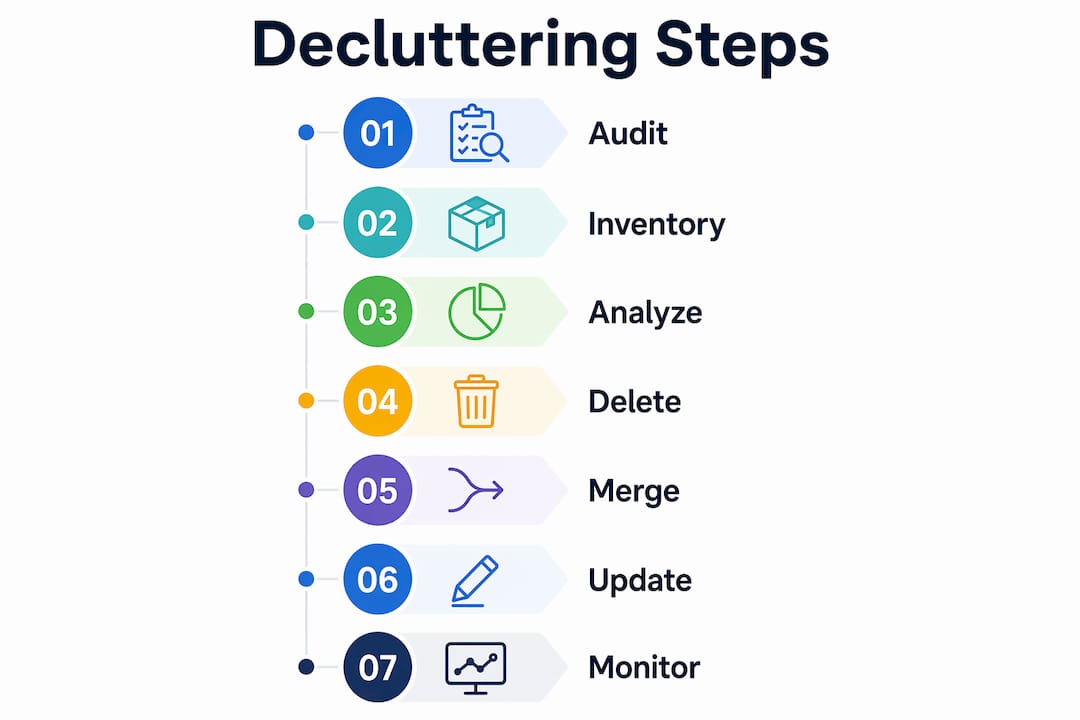
Start by crawling your site with a technical SEO tool to export every live URL. Cross-reference that list against your CMS and your XML sitemap to catch orphaned pages the crawler may miss. The goal is a single master spreadsheet with every URL in one place.
Once your inventory is complete, pull key performance metrics for each URL: organic traffic, backlinks, keyword rankings, clicks, impressions, and internal link count. Twelve months of data gives you a reliable baseline. Shorter windows distort seasonal pages and can lead to bad decisions.
Assigning an action to every page
Content audits assign one of four actions to each URL:
- Keep: Strong traffic, solid backlinks, clear user value. Leave it alone.
- Update: Declining traffic but recoverable. Refresh the content, fix outdated facts, and improve on-page SEO.
- Consolidate: Two or more pages covering the same topic with thin individual performance. Merge them into one authoritative page.
- Remove: No traffic, no backlinks, no user value. Delete and redirect.
This four-action framework prevents the two most common audit mistakes: deleting pages that could be saved with a quick update, and keeping pages that actively harm your site’s average quality score.
Pro Tip: Export your Google Search Console data filtered to the last 12 months before you start. Sort by clicks ascending. The pages at the top of that list are your strongest deletion candidates.
| Metric | Keep threshold | Action if below threshold |
|---|---|---|
| Organic clicks (12 months) | 10+ clicks | Update or Remove |
| Referring domains | 1+ | Consolidate or Remove |
| Keyword rankings | Top 50 | Update or Consolidate |
| Internal links pointing in | 2+ | Update or Remove |
When should you delete, merge, or update pages?
The decision between deleting, merging, and updating is the most consequential call in the entire process. Getting it wrong costs you rankings and link equity.
Criteria for deletion
Delete a page when it meets all three conditions: zero or near-zero organic traffic over 12 months, no referring domains pointing to it, and no meaningful user value that cannot be covered by another page. Product pages for discontinued items, event pages from past years, and duplicate tag or category pages are common candidates.
When you delete a page, always set up a 301 redirect to the most relevant live page. Letting URLs return a 404 error wastes any residual link equity and creates a poor experience for anyone who bookmarked the page.
The case for merging over deleting
Consolidating similar pages can boost rankings more than outright deletion because it concentrates relevance signals onto one stronger page. If you have three blog posts covering slightly different angles of the same keyword topic, merging them into one comprehensive post often outperforms keeping all three separate. The merged page inherits the backlinks and internal links from all three originals.
Merging is the right call when individual pages have some traffic or backlinks but none of them rank well on their own. Combining their authority into a single URL gives search engines a clearer signal about your topical expertise.
Pacing your pruning to protect rankings
Deleting hundreds of pages at once can destabilize rankings. Gradual deletions of 20–30 pages per week over 6–10 weeks gives search engines time to adapt. Bulk removals send confusing crawl signals and can cause temporary ranking drops across pages you never touched.
- Prioritize the clearest deletion candidates first: zero-traffic, zero-backlink pages.
- Process consolidations in the second phase, after redirects from phase one are indexed.
- Handle borderline “update or remove” decisions last, after you see how earlier changes affect overall traffic.
- Monitor Google Search Console weekly throughout the process.
- Pause if you see unexpected drops in previously stable pages.
Pro Tip: Set a calendar reminder for 30 days after each pruning batch. Check your crawl coverage report in Google Search Console to confirm redirects are resolving correctly and no new 404 errors have appeared.
How does simplifying website design improve user experience?
Content pruning addresses what is on your pages. Design decluttering addresses how those pages look and feel. Both matter and neither works as well without the other.

Minimalist website design with clear navigation improves user engagement and directly complements content pruning. When visitors land on a page with fewer competing elements, they focus on the content and the call to action. That focus translates into lower bounce rates and higher conversion rates.
Navigation: fewer links, clearer paths
Your main navigation menu should contain only the links visitors use most. Audit your navigation the same way you audit content: check click data in your analytics platform and remove items that get little to no engagement. A menu with five focused links outperforms one with twelve scattered options every time.
Drop-down menus with more than two levels are a reliable sign of over-complicated site architecture. Flatten your structure where possible. If a page requires three clicks to reach from the homepage, most visitors will never find it.
Reducing visual noise
Excessive banner ads, auto-playing sliders, pop-up overlays, and redundant widgets all compete for attention. Each one adds cognitive load and slows page rendering. Remove any element that does not directly serve the visitor’s goal on that specific page.
White space is not wasted space. It gives content room to breathe and directs the eye toward what matters. The digital marketing tools used by high-performing marketing sites consistently favor clean layouts over feature-heavy designs. Restraint in design signals confidence in your content.
- Remove auto-playing media: it frustrates visitors and slows load times.
- Limit your homepage to one primary call to action.
- Replace image carousels with a single, strong hero image.
- Cut sidebar widgets to two or fewer per page.
- Use consistent fonts and a maximum of two typeface families site-wide.
How do you measure results after cleaning up website content?
Pruning without measurement is guesswork. You need a clear before-and-after picture to know whether your decisions worked and to catch any unintended consequences early.
Set your baseline before you make any changes. Record total organic sessions, average engagement rate, crawl coverage, and Core Web Vitals scores. Screenshot your Google Search Console performance report filtered to the last 90 days. These numbers are your control group.
Regular re-audits prevent clutter from building back up and protect the SEO gains you worked to achieve. Schedule a lightweight audit every quarter: export your sitemap, check for new low-traffic pages, and review any content published since your last audit. A quarterly check takes a fraction of the time your initial audit required.
After pruning, update internal links throughout your site. Pages that linked to removed URLs now need to point to the redirect destination or to a more relevant live page. Broken internal links waste crawl budget and confuse visitors.
Pro Tip: Use Google Analytics 4’s “Pages and screens” report filtered by organic traffic source. Sort by sessions descending, then look at the bottom 20% of your page list. Those are your next audit candidates.
- Track organic traffic weekly for the first 60 days after each pruning batch.
- Monitor Core Web Vitals in Google Search Console for load time improvements.
- Check crawl stats to confirm search engines are spending budget on your best pages.
- Review your sitemap monthly to catch new thin pages before they accumulate.
- Use AI-assisted content evaluation tools for periodic quality checks at scale.
A content audit checklist keeps this process repeatable. The goal is to make site maintenance a scheduled habit, not a crisis response.
Key Takeaways
Effective website decluttering requires a structured audit, careful pruning decisions, and consistent maintenance to produce lasting SEO and user experience gains.
| Point | Details |
|---|---|
| Audit before you act | Inventory every URL and collect 12 months of traffic, backlink, and ranking data before making any decisions. |
| Use the four-action framework | Assign Keep, Update, Consolidate, or Remove to each page based on performance data, not instinct. |
| Merge before you delete | Consolidating overlapping pages concentrates authority and often lifts rankings more than deletion alone. |
| Pace your pruning | Remove 20–30 pages per week over 6–10 weeks to avoid crawl disruption and ranking instability. |
| Maintain on a schedule | Quarterly re-audits prevent clutter from returning and protect the gains your initial cleanup produced. |
What I’ve learned from watching sites get pruned the wrong way
The most common mistake I see is treating content pruning as a one-time cleanup event. A website owner spends two weeks auditing, removes a few hundred pages, sees a traffic bump, and then publishes new content at the same pace as before. Twelve months later, the site is cluttered again and the gains have eroded.
The second mistake is moving too fast. I have watched site owners delete 500 pages in a single weekend because the logic seemed airtight. Rankings dropped across pages that were never touched, and it took months to recover. The gradual deletion approach exists for a reason: search engines need time to process changes at scale.
The third mistake is conflating quantity with quality. A site with 200 excellent pages outperforms a site with 2,000 mediocre ones. Sites are judged on overall quality, so every weak page you keep is a vote against your best pages. That is a hard truth for content teams that measure success by output volume.
My honest advice: treat your website like a curated publication, not an archive. Publish less, update more, and audit on a schedule. The sites that hold rankings through algorithm updates are almost always the ones with disciplined content hygiene, not the ones with the most pages.
— Maayan
How Seo-analytic helps you build a cleaner, stronger website
A decluttered site is only as good as the foundation it sits on. Seo-analytic works with website owners and digital marketers to build sites that are structured for performance from the start, so content pruning becomes a maintenance task rather than a rescue operation.

The website building basics guide from Seo-analytic walks US business owners through site architecture, page structure, and content planning in plain language. For owners who already have a site and need to improve it, Seo-analytic’s SEO services cover technical audits, content strategy, and ongoing optimization. The team specializes in turning cluttered, underperforming sites into focused, high-converting ones.
FAQ
What is content pruning in SEO?
Content pruning is the practice of removing, merging, or updating underperforming pages to raise a site’s overall quality score. Search engines use average content quality across a domain to determine rankings, so weak pages hurt strong ones.
How often should I audit my website content?
A full audit once per year and a lightweight quarterly check is the recommended cadence. Regular re-audits prevent clutter from accumulating and protect SEO gains over time.
Will deleting pages hurt my rankings?
Deleting pages too quickly can cause temporary ranking instability. Removing 20–30 pages per week over 6–10 weeks, with 301 redirects in place, minimizes disruption and preserves link equity.
Is it better to merge pages or delete them?
Merging is usually the better choice when pages have any traffic or backlinks. Consolidating overlapping content concentrates authority onto one stronger page, which typically produces better ranking results than deletion.
What metrics determine whether a page should be kept?
The core metrics are organic clicks, referring domains, keyword ranking positions, and internal link count over a 12-month window. A page with fewer than 10 organic clicks, no referring domains, and no unique user value is a strong removal candidate.