

TL;DR:
- A complete and optimized Google My Business profile boosts local visibility and customer engagement.
- Verification methods include postcards, phone, email, and increasingly, video recordings of your location.
- Ongoing activity, such as responding to reviews and posting updates, is essential for sustained local search success.
Local customers are searching for businesses like yours right now, and if you’re not showing up in Google’s local results, you’re handing those sales to competitors. A properly built Google My Business profile is one of the most powerful free tools available to small business owners in 2026. Yet most entrepreneurs either skip it entirely or set it up halfway and wonder why nothing happens. This guide walks you through every step: who qualifies, what information you need, how to create and verify your profile, and how to keep it optimized so it actually drives foot traffic, calls, and real revenue.
Table of Contents
- Who is eligible and what you need before starting
- Step-by-step process: Creating your profile the right way
- How to verify your Google My Business profile
- Top mistakes, troubleshooting, and expert optimization tips
- The reality of Google My Business: What most guides miss
- Ready to grow your business? Take the next step
- Frequently asked questions
Key Takeaways
| Point | Details |
|---|---|
| Eligibility is crucial | Only businesses with in-person customer contact can create a Google My Business profile. |
| Precision drives results | Exact business name, address, and category are critical for ranking and verification. |
| Verification needs care | Choose the right verification method and avoid edits during the process for a smooth setup. |
| Ongoing optimization wins | Regularly update your profile with photos, reviews, and accurate info to maximize visibility. |
Who is eligible and what you need before starting
Not every business qualifies for a Google My Business profile, and knowing the rules upfront saves you a lot of frustration. According to Google’s eligibility rules, your business must have in-person customer contact, meaning either a physical storefront or a defined local service area where you visit customers. Businesses that operate entirely online, use a PO box as their address, function as lead-generation sites, or offer age-restricted services without a physical location are not eligible.
Understanding local search ranking factors also helps you appreciate why this eligibility requirement exists. Google wants to connect real people with real, accessible businesses in their area.
Before you start, gather everything you need so the process goes smoothly:
- Exact legal business name (match your signage and other online listings)
- Physical address or service area (city, zip code, radius you serve)
- Primary phone number (local number preferred over toll-free)
- Website URL
- Business hours including holidays
- Primary and secondary categories (e.g., “Plumber” or “Italian Restaurant”)
- Photos of your storefront, interior, team, and products
| Business type | Eligible? | Address shown publicly? |
|---|---|---|
| Brick-and-mortar storefront | Yes | Yes |
| Service-area business (plumber, cleaner) | Yes | No (service area shown) |
| Online-only store | No | N/A |
| PO box or virtual office | No | N/A |
| Lead-generation website | No | N/A |
Pro Tip: Prepare a simple document with all the above details before you open Google. Switching between tabs mid-setup increases the chance of typos that cause NAP (name, address, phone) mismatches later.
Step-by-step process: Creating your profile the right way
With the essentials ready, it’s time to create your profile the right way. Follow these steps carefully, because small errors here can delay verification or hurt your rankings.
- Sign in to your Google account. Use a business email you control long-term, not a personal Gmail you might lose access to.
- Go to Google Business Profile setup and click “Manage now.”
- Search for your business name. If it appears, claim it. If not, select “Add your business to Google.”
- Enter your exact business name. Match your real-world signage and every other online listing precisely.
- Select your primary category. This is one of the strongest local search trends for 2026 signals Google uses to rank you. Choose the most specific category that fits.
- Add your location or service area. Storefronts enter a physical address. Service-area businesses enter the cities or zip codes they serve.
- Enter your phone number and website URL. Double-check every digit.
- Set your business hours. Include special hours for holidays.
- Write a business description. Keep it natural, factual, and focused on what you do and who you serve.
The Google Business Profile Setup Guide confirms that completing all these fields before requesting verification significantly improves approval speed.
| Feature | Storefront profile | Service-area profile |
|---|---|---|
| Address shown publicly | Yes | No |
| Service radius displayed | No | Yes |
| Best for | Restaurants, retail, clinics | Plumbers, cleaners, landscapers |
| Photo of location recommended | Yes | Team/vehicle photos work well |
Pro Tip: Fill out every single field, including the business description and attributes, before you hit verify. Incomplete profiles take longer to rank, and editing during verification can reset the clock entirely. Learn more about managing your Google Business page once you’re live.
How to verify your Google My Business profile
Once your details are set, the final crucial step is verification. Google uses verification to confirm your business is real and located where you say it is. There are four main methods, and the one you’re offered depends on your business type and history.
Verification methods and what to expect:
- Postcard. Google mails a card with a PIN to your business address. Expect 5 to 14 days. Do not move or change your address before it arrives.
- Phone or text. Available for some businesses. Google calls or texts a code to your listed number instantly.
- Email. Similar to phone, Google sends a code to your verified business email.
- Video verification. You record a short video showing your location, signage, and proof of operation. Takes 3 to 5 days to review. This is increasingly common for new profiles.
- Live call. A Google representative calls you directly. This is the escalation option and has a near-100% success rate for legitimate businesses.
According to video verification insights, video is now one of the most common methods Google uses for new business profiles, so be prepared to film your storefront or work vehicle.
Important: Do not edit your business name, address, or category while verification is in progress. Any changes can cancel the process and force you to restart from the beginning.
If your postcard never arrives or your video is rejected, do not panic. Check that your address is entered exactly as it appears on official mail. If issues persist, escalate to the live call option through Google support. This method resolves almost every legitimate case quickly.

For businesses with multiple locations, the process scales differently. Check out SEO for multi-location businesses to understand how bulk verification works.
Pro Tip: When recording your verification video, make sure your business signage, street address, and the interior of your location are all clearly visible. Poor lighting or shaky footage is the number one reason video verification gets rejected.
Top mistakes, troubleshooting, and expert optimization tips
Even after you’re verified, ongoing optimization and caution help you outperform competitors. Getting listed is step one. Staying visible and avoiding penalties requires consistent attention.
Common mistakes that hurt rankings or trigger suspension:
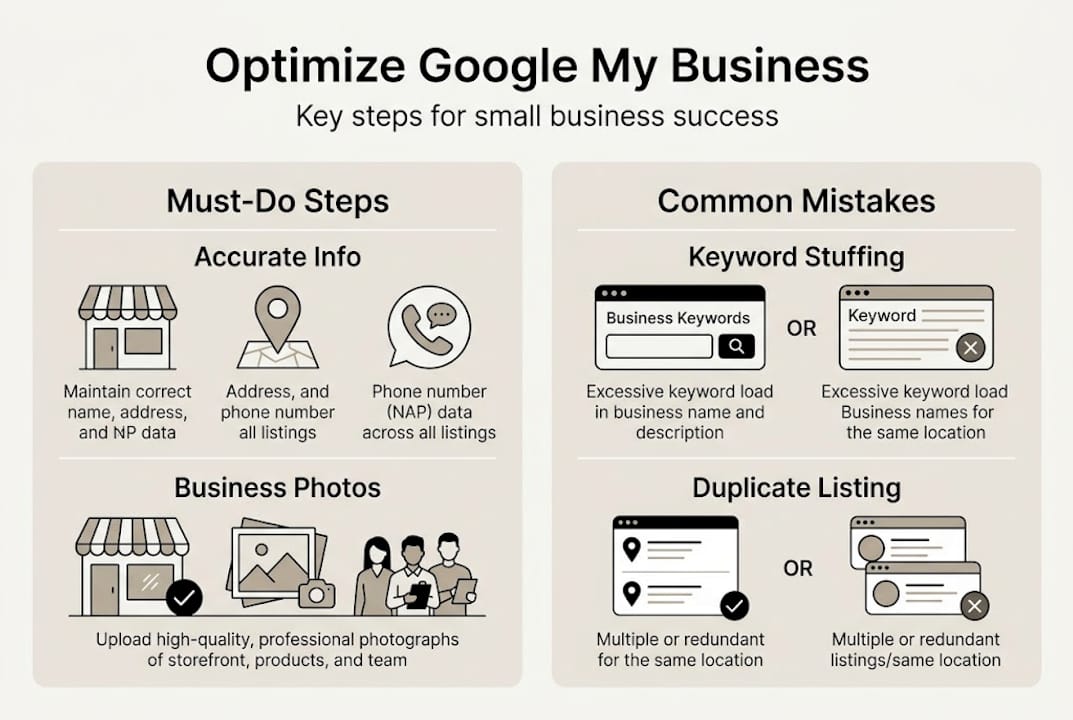
- Keyword stuffing in your business name. Adding words like “best” or “cheap” to your name field violates Google’s guidelines and can get your profile suspended.
- NAP mismatches. If your name, address, or phone differs across your website, social profiles, and Google listing, it confuses Google and lowers your rankings.
- Wrong primary category. Choosing a broad or slightly off category is one of the most common reasons profiles underperform.
- Duplicate listings. If your business was previously listed, a duplicate may exist. Merge or remove it immediately.
- Editing info carelessly. Even after verification, sudden changes to core details can trigger a re-review.
According to expert optimization insights, keyword stuffing, NAP inconsistencies, and duplicate listings are the leading causes of profile suspension and lost rankings.
Here is the good news: only 35% of SMBs have a verified and optimized profile, which means you have a real opportunity to stand out if you do this right. Optimized profiles consistently drive 2x more customer actions than incomplete ones.
Ongoing optimization actions that move the needle:
- Upload 10 or more high-quality photos. Profiles with strong photo libraries see significantly more views and engagement.
- Respond to every review, positive or negative. This signals activity and builds trust.
- Post updates, offers, and events at least twice a month.
- Use the Q&A section to answer common customer questions proactively.
Pair your Google profile with solid directory listing strategies and active business reputation management to build a local presence that compounds over time. For edge cases and unusual suspension scenarios, troubleshooting edge cases from Google’s support center is a reliable resource.
Pro Tip: Set a monthly calendar reminder to audit your profile. Check that hours are current, photos are fresh, and no unauthorized edits have appeared. Catching issues early prevents ranking drops before they happen.
The reality of Google My Business: What most guides miss
Let’s step back and look at what separates average Google My Business users from those who truly win local search. Most guides focus entirely on setup, as if getting listed is the finish line. It is not even close.
The businesses we see dominating local results are not there because they filled out a form once. They are there because they treat their profile as a living part of their marketing. They respond to reviews within hours. They post updates every week. They fix NAP inconsistencies across every platform the moment they spot one.
The uncomfortable truth is that the majority of suspended or unranked profiles got that way through neglect, not malice. Owners set up a profile, forget about it, and then wonder why a competitor with half their experience shows up first. Understanding local ranking factors makes it clear: Google rewards businesses that stay active and consistent.
Quality photos, prompt review responses, and regular updates are not optional extras. They are the difference between a profile that sits idle and one that generates real calls and foot traffic every week. Treat your Google My Business profile like you treat your best employee: give it attention, keep it updated, and it will work hard for you.
Ready to grow your business? Take the next step
Your Google My Business profile is a powerful starting point, but it works best when it is part of a broader digital strategy. A strong profile drives traffic, and a well-built website converts that traffic into paying customers.
At our agency, we help small business owners build that full picture. Whether you want to master digital marketing basics, follow a proven step-by-step website building plan, or expand your reach through social media marketing, we have the resources and expertise to help you grow. Your optimized profile deserves a digital presence that matches its potential. Explore our guides and services to make sure every piece of your online presence is working together.
Frequently asked questions
Can an online-only business create a Google My Business profile?
No. Google’s eligibility rules require in-person customer interaction, so online-only stores, lead-generation sites, and businesses using PO boxes do not qualify for a profile.
How long does it take to verify a Google My Business profile?
Postcard verification takes 5 to 14 days, video verification takes 3 to 5 days, and phone or email verification can be nearly instant for eligible businesses.
What happens if my Google My Business verification fails?
Review your business details for any errors, then escalate to a live support call. According to live call verification tips, this method resolves most legitimate cases quickly and reliably.
Why was my profile suspended or not ranking?
The most common causes are keyword stuffing in the business name, NAP mismatches, duplicate listings, and wrong category selection. Keeping your information accurate and consistent across all platforms is the best prevention.
How does posting photos and updates help my business?
Profiles with 10 or more photos and regular updates drive 2x more actions such as calls, website visits, and direction requests compared to incomplete or inactive profiles.