
TL;DR:
- AI-powered tools enable small businesses to create and launch conversion-optimized landing pages in minutes without a developer. Using the right tool, connecting analytics, and focusing on speed and mobile responsiveness improves campaign results significantly. Rapid iteration and testing help entrepreneurs refine their pages effectively rather than waiting for perfection.
A landing page is a standalone web page designed to convert a single visitor action, and building landing pages quickly is now achievable in minutes with AI-powered tools. Platforms like RationalGo and WarmPage have changed what “fast” means for small business owners. You no longer need a developer or a week of back-and-forth to go live. The right tool, a clear offer, and a defined audience are all you need to launch a conversion-ready page today.
What tools and features enable building landing pages quickly?
The fastest way to create landing pages is to choose a tool built for speed, not just flexibility. AI-powered builders like RationalGo and WarmPage sit at one end of the spectrum. Drag-and-drop platforms like Unbounce and Instapage sit at the other. Each serves a different type of entrepreneur.
AI builders vs. drag-and-drop platforms
AI-powered builders generate complete, conversion-optimized pages in under 60 seconds. They include a hero section, feature highlights, social proof, and an email signup form by default. That means you skip the blank-canvas problem entirely.

Drag-and-drop platforms give you more visual control. Unbounce starts at $187/month and includes Smart Traffic, which automatically routes visitors to the variant most likely to convert. Instapage starts at $99/month and is known for its collaboration tools and CDN-backed page speed. Systeme.io offers a free tier for bootstrapped businesses. HubSpot scales to $800 or more per month for teams that need deep CRM integration.
Key features to look for
Not every builder fits every business. Prioritize these features when comparing your options:
- AI content generation: Writes headlines, body copy, and CTAs from a short prompt
- Mobile responsiveness: Pages must render correctly on phones without manual adjustment
- A/B testing: Built-in split testing lets you improve conversion rates without third-party tools
- CRM and analytics integration: Connects leads directly to your sales workflow
- Page load speed: Pages that load in 4 seconds lose 53% of mobile visitors compared to pages loading in 2 seconds
That last point matters more than most entrepreneurs realize. Slow pages kill campaigns before the copy even gets a chance to work.
Pro Tip: Before committing to a paid plan, test the builder’s page speed using Google PageSpeed Insights on a sample page. A beautiful template on a slow server costs you leads.
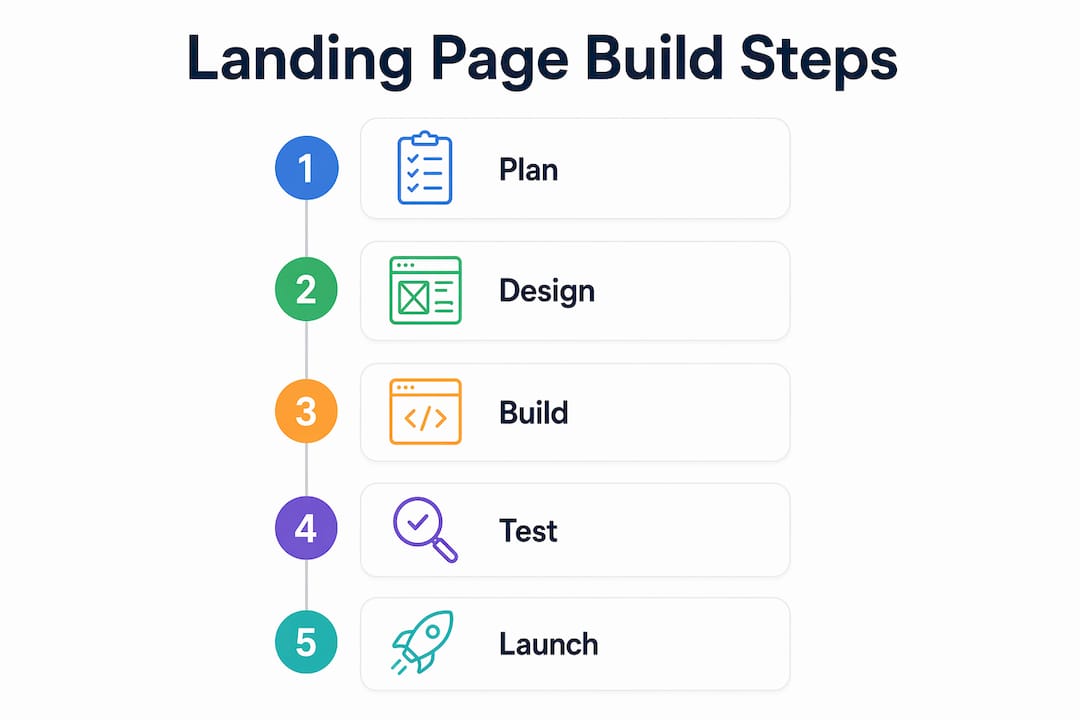
How to execute a fast landing page build step by step
Quick landing page design does not mean sloppy design. A clear process keeps quality high even when you are moving fast. Follow these six steps to go from idea to live page in under an hour.
-
Define your offer and audience. Write one sentence describing what you are offering and who it is for. Vague briefs produce vague pages. The more specific your input, the better the AI output.
-
Choose the right tool. Use an AI generator like RationalGo for maximum speed. Use a drag-and-drop builder like Unbounce or Instapage when you need precise visual control or existing brand templates. Fast deployment depends on matching the tool to your team’s skills, not just your budget.
-
Generate the page. Enter your prompt or fill in the builder’s setup wizard. AI tools produce a full draft in seconds. Template-based builders give you a starting structure you can edit immediately.
-
Customize copy, images, and your CTA. AI-generated copy is a strong first draft, not a final product. Review every headline for clarity. Replace stock images with real product photos or brand visuals when possible. Make your call-to-action specific: “Start your free trial” outperforms “Submit” every time.
-
Publish and distribute the URL. Most builders host your page on their CDN. Copy the URL and push it to your ad campaigns, email list, and social profiles. Do not wait for perfection. A live page that collects data beats a perfect page still in draft.
-
Set up tracking and iterate. Connect Google Analytics or your CRM before you drive traffic. Marketing teams that iterate rapidly achieve better campaign results than teams waiting for a single polished version. Check your data after 48 hours and adjust.
Pro Tip: Write your CTA button text as a first-person statement. “Get my free quote” consistently outperforms “Get a free quote” in A/B tests because it reduces the psychological distance between the visitor and the action.
What common challenges slow down landing page building?
Speed without awareness creates expensive problems. These are the four most common bottlenecks entrepreneurs hit, and how to avoid each one.
-
Developer dependency. Waiting on a developer to build or edit a page adds days to your timeline. AI builders and no-code platforms exist specifically to remove this bottleneck. If your current workflow requires a developer for every page change, switch tools.
-
Ignoring mobile optimization. A page that looks great on desktop but breaks on mobile loses more than half your audience. Choose builders that apply mobile-responsive design automatically, not as an afterthought.
-
Skipping compliance details. Rushing a page live without GDPR compliance or proper SEO schema creates costly fixes later. Tools like Shippage, a command-line builder for developers, automate GDPR compliance, SEO schemas, and exit-intent popups in a single prompt. That is the standard every builder should meet.
-
Missing integrations. A landing page that does not connect to your CRM or email platform forces manual data entry. Manual workflows slow follow-up and lose leads. Confirm your builder integrates with your existing tools before you build.
“The fastest landing page is the one that is live, compliant, and connected to your analytics. Speed without those three elements is just noise.”
How do adaptive AI landing pages improve lead quality?
Adaptive landing pages represent the next step beyond static pages. Instead of showing every visitor the same content, these pages respond to visitor input in real time. WarmPage builds adaptive, conversational pages in about 2 minutes. That is fast enough to launch a new campaign the same day you conceive it.
Here is how the process works and why it matters for lead quality:
- Personalized visitor flows. The page asks visitors a short series of questions. Answers change what content appears next, so each visitor sees messaging relevant to their specific situation.
- Automatic lead filtering. Conversational flows filter out unqualified leads before they reach your sales team. You spend time only on prospects who match your criteria.
- Richer lead data. Instead of a name and email, your CRM receives the full conversation context. Your sales team knows what the prospect needs before the first call.
- Fast setup. WarmPage’s setup time of approximately 2 minutes makes it practical for small teams without dedicated marketing staff.
For small businesses running paid ads, adaptive pages reduce wasted ad spend by improving the quality of leads, not just the quantity. Connecting these pages to your conversion optimization strategy compounds the return on every campaign dollar.
| Feature | Static landing page | Adaptive AI landing page |
|---|---|---|
| Setup time | 30 min–2 hours | ~2 minutes (WarmPage) |
| Lead filtering | Manual (sales team) | Automatic (conversational flow) |
| Visitor personalization | None | Real-time, based on responses |
| CRM data richness | Name, email | Full conversation context |
| Best for | Broad awareness campaigns | High-intent lead generation |
Key takeaways
The fastest path to a high-converting landing page combines the right AI tool, a clear offer, and analytics connected from day one.
| Point | Details |
|---|---|
| Speed is achievable | AI tools like RationalGo build complete pages in under 60 seconds. |
| Match tool to need | Use AI builders for speed; use drag-and-drop platforms like Unbounce for visual control. |
| Mobile and speed matter | Pages loading in 4 seconds lose 53% of mobile visitors, so choose builders with CDN support. |
| Compliance cannot be skipped | Automate GDPR and SEO schema from the start to avoid costly post-launch fixes. |
| Iterate fast | Teams that update pages frequently outperform those waiting for a single perfect version. |
Why I stopped chasing the perfect page and started shipping faster
The biggest mistake I see entrepreneurs make is treating a landing page like a finished product. They spend two weeks perfecting copy, debating button colors, and waiting for a designer. Then they launch, get 200 visitors, and realize the headline does not match what their ad promised.
The tools available now, RationalGo, WarmPage, Unbounce, remove every excuse for slow launches. I have seen small business owners go from zero to a live, tracked, mobile-ready page in under 15 minutes using AI builders. The page was not perfect. It did not need to be. It needed to be live and connected to analytics.
What I have learned is that the first version of a landing page is a hypothesis. You are testing whether your message resonates with your audience. AI-generated copy gives you a credible starting point, but you must read it critically. Does the headline match your ad? Does the CTA match the offer? Those two checks take five minutes and catch 80% of the problems.
The other thing most guides skip: connect your CRM and analytics integration before you drive a single visitor. I have seen entrepreneurs run $500 in ads to a page with no tracking and walk away with nothing but a credit card charge. Set up your tracking first. Always.
Speed and quality are not opposites. Fast iteration with real data produces better pages than slow perfection without it. Ship the page, read the data, and improve. That cycle beats any single “perfect” launch.
— Maayan
Ready to build your next landing page the right way?
Seo-analytic works with US entrepreneurs and small business owners who want more than a fast page. They want a page that fits into a complete marketing funnel, loads fast on every device, and drives real leads.
Start with Seo-analytic’s website building guide for business owners to understand how landing pages fit into your broader online presence. From responsive design fundamentals to hosting that keeps your pages fast under traffic, Seo-analytic covers every layer of the funnel. If you are running paid traffic to your pages, the social media marketing resources will help you align your ad creative with your landing page message for stronger results.
FAQ
How fast can I build a landing page with AI?
AI tools like RationalGo build complete landing pages in under 60 seconds. The output includes a hero section, feature highlights, social proof, and an email capture form.
What is the difference between an AI builder and a drag-and-drop builder?
AI builders generate page content and layout automatically from a prompt, making them faster for rapid creation. Drag-and-drop builders like Unbounce give you more manual control over design and are better suited for brand-specific customization.
Do I need a developer to build a landing page quickly?
No. AI builders and no-code platforms remove developer dependency entirely. Fast deployment depends on matching the tool to your team’s skills, and most modern builders require zero coding knowledge.
What is an adaptive landing page?
An adaptive landing page changes its content in real time based on visitor responses. WarmPage creates these conversational pages in about 2 minutes and automatically filters out unqualified leads before they reach your sales team.
How much do landing page builders cost?
Pricing ranges from free tiers, such as Systeme.io, to $800 or more per month for platforms like HubSpot. Instapage starts at $99/month and Unbounce at $187/month, with features like A/B testing and analytics integration included at most paid tiers.