
TL;DR:
- UX design ensures your website provides a smooth and effective user journey to boost conversions.
- Clear navigation, easy checkout, and handling edge cases are key to reducing bounce rates.
- Combining AI tools with human judgment enhances understanding of real user behavior and improves UX.
Most business owners treat their website like a storefront window: if it looks good, customers will walk in. But here’s the problem. A beautiful window means nothing if the door is stuck. UX design, which stands for user experience design, is the discipline that makes sure your digital door swings open smoothly every time. Many founders confuse UX with UI (user interface), thinking they’re the same thing. They’re not, and mixing them up can cost you real customers. This guide breaks down exactly what UX design is, how it differs from UI, and what you can do right now to make your website work harder for your business.
Table of Contents
- What is UX design? Foundations every founder should know
- How great UX design boosts website conversions
- UX versus UI: What’s the difference, and why does it matter?
- Modern UX design: Human insight, AI tools, and real-world edge cases
- Real talk: What most guides get wrong about UX design
- Take your website further with smarter UX strategies
- Frequently asked questions
Key Takeaways
| Point | Details |
|---|---|
| UX boosts conversions | A well-designed user experience can significantly increase your website conversion rates. |
| UX vs. UI clarity | Understanding the difference between UX and UI helps you make better design decisions for business success. |
| AI supports, humans validate | AI tools help with UX design, but human expertise is critical for testing real user scenarios. |
| Design for edge cases | Addressing unusual user behaviors or errors builds trust and reduces customer loss. |
What is UX design? Foundations every founder should know
UX design is the process of shaping how people experience your website from the moment they arrive to the moment they leave. It covers every touchpoint: how easy it is to find information, how fast pages load, how clearly your content communicates, and how smoothly a visitor moves from browsing to buying. Think of it as designing the entire trip, not just the destination.
The scope of UX design is wider than most founders realize. It includes:
- User research: Understanding who your visitors are and what they need
- Information architecture: Organizing content so it makes sense
- Usability: Making sure tasks are easy to complete
- Accessibility: Ensuring your site works for people with disabilities
- Content strategy: Delivering the right message at the right moment
For a business owner, strong user experience explained means fewer visitors bouncing off your site and more of them converting into paying customers. Every barrier you remove is a sale you keep.
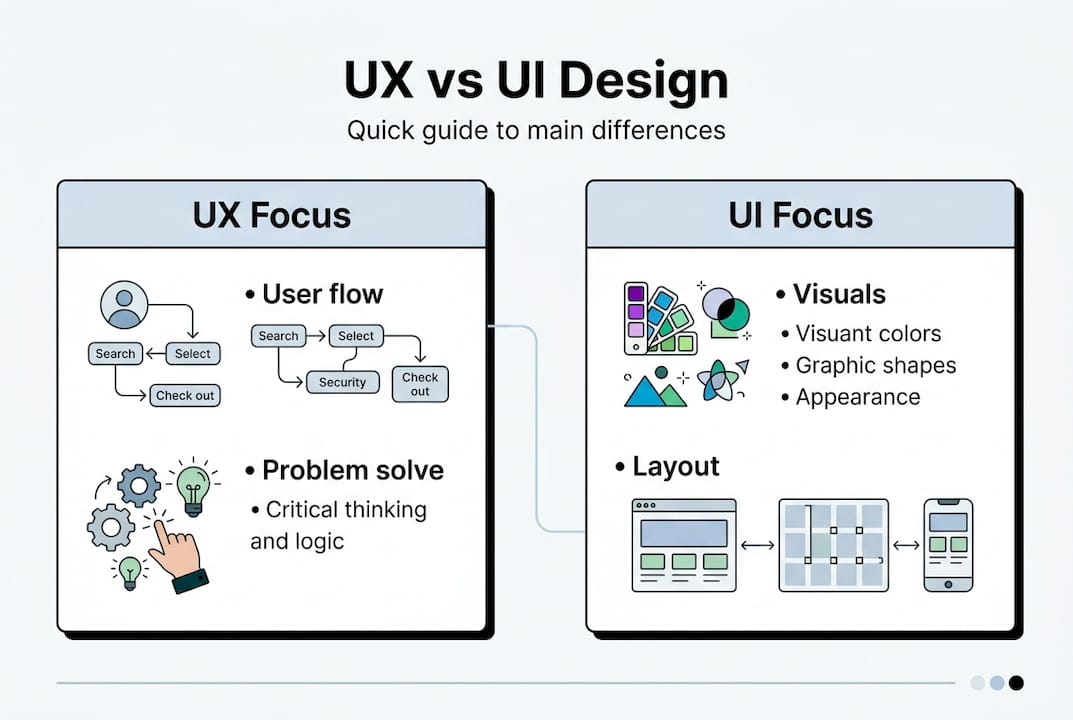
Now, where does UI fit in? UI design handles the visual and interactive layer: the colors, buttons, typography, icons, and layout. As UX vs UI experts put it, UX is the overall journey and problem-solving process, while UI is the visual and interactive elements that bring it to life. You can think of UX as the architect’s blueprint and UI as the interior decorator’s choices.
“UX without UI is a skeleton. UI without UX is a beautiful painting nobody can enter.”
Both matter, but they serve different purposes. Solid UI design strategies can make your site visually compelling, but if the underlying experience is confusing, visitors will leave no matter how good it looks.
How great UX design boosts website conversions
Here’s a number worth remembering: businesses that invest in UX design can see conversion rates improve dramatically, with some studies reporting gains of up to 400% after targeted UX improvements. That’s not a typo. Fixing how people move through your site can quadruple the percentage who actually take action.
The reason is straightforward. Friction kills conversions. When a visitor hits a confusing navigation menu, a broken checkout step, or an unhelpful error message, they don’t troubleshoot. They leave. Clear navigation, intuitive checkout flows, and honest error messages remove those exit ramps.
Here’s how to quickly audit your own site for UX conversion problems:
- Walk through your site as a stranger. Open an incognito window and pretend you’ve never seen your business before. Can you find what you need in under 10 seconds?
- Test your checkout or contact process end to end. Complete it yourself. Note every moment of hesitation.
- Check your error messages. If a form fails, does it tell users exactly what went wrong and how to fix it?
- Look at your mobile experience. More than half of web traffic is mobile. Does your site work as well on a phone as on a desktop?
- Review your analytics. High drop-off on a specific page is a red flag for a UX problem.
Edge cases, meaning the unexpected things real users do, are where most sites quietly lose business. A user with a slow connection, a visitor who types their email wrong, a customer who tries to go back mid-checkout: designing for edge cases builds trust, reduces abandonment, and handles real-world messiness that ideal-path thinking ignores.
Pro Tip: Run your user testing for conversions on non-happy paths first. Ask testers to make mistakes on purpose, use a slow connection, or try to break the checkout. What you find will surprise you and save you money.
Applying conversion best practices alongside strong UX principles creates a compounding effect: more visitors complete their goals, and your revenue grows without spending more on ads.
UX versus UI: What’s the difference, and why does it matter?
This confusion trips up founders constantly, and it’s worth clearing up once and for all. UI is what your site looks like. UX is how your site works. Both are necessary, but they require different thinking.

| Feature | UX design | UI design |
|---|---|---|
| Focus | User journey and problem-solving | Visual appearance and interaction |
| Goal | Make tasks easy and efficient | Make the interface attractive and clear |
| Tools | Wireframes, user flows, research | Color palettes, typography, icons |
| Measures success by | Task completion, conversion rates | Visual consistency, aesthetic appeal |
| Example | Simplifying a 5-step checkout to 3 steps | Choosing the right button color to draw the eye |
As AI Is Reshaping UX Design explains, UX is the overall journey and problem-solving layer, while UI covers the visual and interactive website features that users actually touch and see.
A visually impressive site with poor UX will still fail. Visitors might admire the design for a moment, but if they can’t find the pricing page, can’t figure out how to contact you, or get confused by a cluttered product layout, they leave. Pretty doesn’t pay the bills. Functional does.
Here’s how to balance both on your business site:
- Start with UX. Map out the user journey before you design a single button.
- Let UX decisions guide UI choices. If the journey requires a prominent call-to-action, your UI design explained should make that button impossible to miss.
- Test usability before aesthetics. A site that works beats a site that dazzles.
- Revisit both regularly. User behavior changes, and your design should adapt.
Modern UX design: Human insight, AI tools, and real-world edge cases
AI tools are now part of the UX design process, and they’re genuinely useful. They can analyze user behavior at scale, run A/B tests faster than any human team, and flag usability patterns across thousands of sessions. For a startup with a lean team, that’s a real advantage.
But AI has a blind spot: nuance. It can tell you that users drop off at step three of your checkout, but it can’t always tell you why. Is it a confusing label? A trust issue? A technical glitch on a specific device? AI accelerates UX work but lacks the domain nuance needed for edge cases, which is why human validation remains essential.
| Task | AI strength | Human strength |
|---|---|---|
| Analyzing large data sets | Excellent | Slow and resource-heavy |
| Identifying patterns | Strong | Strong with context |
| Understanding emotional context | Weak | Strong |
| Handling edge cases | Limited | Essential |
| Generating design variations | Fast | Creative and intentional |
Edge cases are the real test of a website’s UX. What happens when a user submits a form with no internet connection? What if they enter a discount code that’s expired? What if they’re using an older browser? Designing for these moments is what separates a site that builds trust from one that frustrates and loses customers.
Pro Tip: Use AI strategies in digital marketing to gather behavioral data at scale, then bring in human judgment to interpret what the data actually means for your specific customers. The combination is far more powerful than either alone.
For founders focused on reducing website bounce rate, pairing AI-driven insights with human-led user testing is the most reliable path to a site that holds attention and drives action.
Real talk: What most guides get wrong about UX design
Most UX guides focus on the happy path: the ideal user who knows exactly what they want, clicks perfectly, and converts without friction. That user barely exists in real life.
We’ve seen founders invest thousands in polished interfaces, only to watch their conversion rates stay flat. The reason is almost always the same: they designed for perfection and ignored the mess. Real users mistype, second-guess themselves, lose their connection, and navigate in unexpected ways. If your site only works for the perfect visitor, it’s failing most of your actual customers.
UX is not a one-time project. It’s a continuous feedback loop. Even small businesses should be running simple tests, reading their analytics, and adjusting based on what real users do, not what founders assume they’ll do. An in-depth UX guide can give you the framework, but your own customer data is your most valuable input.
The founders who win with UX are the ones who stay curious, stay humble, and treat every drop-off as a question worth answering.
Take your website further with smarter UX strategies
Understanding UX design is the first step. Putting it into practice is where the real growth happens. Whether you’re building a new site from scratch or improving an existing one, starting with the right foundations saves you from expensive redesigns later.
Our team at seo-analytic.com specializes in helping business owners and founders build websites that don’t just look great but actually convert. From your website building guide to a full in-depth user experience guide, we’ve built resources specifically for founders who want results. Ready to see real conversion rate growth? Start with our guides and reach out when you’re ready to take the next step.
Frequently asked questions
What is the difference between UX and UI design?
UX vs UI comes down to this: UX focuses on the overall user journey and problem-solving, while UI handles how things look and feel on the screen. Both are necessary, but they serve different functions in your website’s success.
Why does UX design matter for small businesses?
Good UX removes barriers, increases website conversions, and keeps customers coming back. As edge case design research shows, handling real-world user mistakes builds the trust that turns one-time visitors into loyal customers.
Can artificial intelligence replace human UX designers?
AI speeds up testing and routine analysis, but human validation is still essential for edge cases and nuanced decision-making that automated tools miss.
How can I quickly improve my website’s UX?
Start by walking through your site as a brand-new visitor, fix any confusing steps, and make sure error handling is clear and helpful to reduce abandonment at critical moments.